Friday, September 27, 2013

A checklist for asking good questions

I love answering questions about MvvmCross (and more besides) and I spend lots of time doing it.

Often the questions are a joy to answer - and they help add lots to MvvmCross itself.

Here's a checklist of tips to help make sure your question is a joy to answer. It's stolen and adapted from Jon Skeet at: http://msmvps.com/blogs/jon_skeet/archive/2012/11/24/stack-overflow-question-checklist.aspx

  • Have you done some research before asking the question? 
  • If you found anything relevant did you include that in your question?
  • Have you explained what you've already tried to solve your problem? 
  • If your program throws an exception or performs 'incorrectly', have you tried to reproduce the behaviour in a small test app?
  • Have you specified which language and platform you're using, including version numbers where relevant? 
  • If your question includes code, have you written it in a way that will allow others to run it? Are there missing parts? Have you cut out as much excess code as you can?
  • If your question includes code, have you checked that it's correctly formatted? 
  • If your code doesn't compile, have you included the exact compiler error? 
  • If your question doesn't include code, are you sure it shouldn't? 
  • If your program throws an exception, have you included the exception, with both the message and the stack trace?
  • If your program throws an exception or performs 'incorrectly', have you included any trace or log messages that might be useful?
  • If your program produces different results to what you expected, have you stated what you expected, why you expected it, and the actual results?
  • If your question is related to anything locale-specific (languages, time zones) have you stated the relevant information about your system (e.g. your current time zone)?
  • Have you checked that your question looks reasonable in terms of formatting? 
  • Have you checked the spelling and grammar to the best of your ability?
  • Have you read the whole question to yourself carefully, to make sure it makes sense and contains enough information for someone coming to it without any of the context that you already know?  
  • If you've included a technical term is it going to be clear to a reader what you meant by that term - e.g. if you asked "I want to display a notification" then does that mean just some/any visual indication or does it mean an Android notification?
  • Does your title describe the question you've asked?
  • Have you asked about just one thing? Answering one specific question is much easier than answering several different things at the same time.
And one more....
  • Have you tried squeezing a technical question into 140 characters on Twitter? If you have, please delete your tweet and try asking with more detail on StackOverflow or on a forum. 

Thanks to Jon Skeet for the base list at: http://msmvps.com/blogs/jon_skeet/archive/2012/11/24/stack-overflow-question-checklist.aspx - and for posts like http://msmvps.com/blogs/jon_skeet/archive/2010/08/29/writing-the-perfect-question.aspx too

Wednesday, September 25, 2013

N=39 - CrossLight on Xamarin.iOS/MonoTouch (aka Project Chimp)

This video is a follow on from http://slodge.blogspot.co.uk/2013/06/n30-crosslight-aka-project-chimp-n1.html where I showed how to use the MvvmCross binding layer in Android without using the higher layers (the navigation service, the plugin loader, the thread dispatcher, etc).


In this video I quickly do the same thing for Xamarin.iOS.


The process is pretty simple:


1. Add references to the CrossCore and Binding assemblies for MvvmCross (in the video I use nuget CrossCore package - https://www.nuget.org/packages/MvvmCross.HotTuna.CrossCore/)

2. Add a small setup class and call it from your appdelegate start code


3. Add you ViewModel - and INotifyPropertyChanged will do

4. Adjust your ViewController so that it can do data-binding to an instance of your ViewModel


5. Run :)


The code for today is at: https://github.com/slodge/NPlus1DaysOfMvvmCross/tree/master/N-39-CrossLight-Touch


The video is:


For a full index of N+1 videos, see http://mvvmcross.wordpress.com

N=38 - More maps and more zombies

Today, I tried to extend the N=37 Maps Xamarin.iOS sample into 4 new directions:

  1. A draggable annotation that updates it's location in the ViewModel
  2. An ObservableCollection of annotations.
  3. A mechanism to update the map center from the ViewModel
  4. A mechanism to update the ViewModel from map panning


The code for this is on: https://github.com/slodge/NPlus1DaysOfMvvmCross/tree/master/N-38-Maps


The video is:


Disclaimer: I only tested on iOS6 - and there were a few animation details there that needed a little smoothing... I've not tested them on iOS5 or iOS7 yet - expect more there too!


For a full index of N+1 videos, see http://mvvmcross.wordpress.com

Thursday, September 19, 2013

N=37 - Maps and Zombies part 1 - N+1 Days of MvvmCross

After a slightly longer than planned summer break, I'm finally returning to these recordings. Sorry about the elongated break, but I'm back now, and hoping to cover some more advanced topics :)


To start with, I thought I'd try some mapping. This is going to take a few videos to get completed.... just easing back into this process.


First up:

  • we create just a PCL and an iOS project
  • we add an MKMapView view
  • we databind some annotations to the ViewModel

The video for this is:


I'm afraid I did get interrupted during the recording, so you might hear someone asking if I wanted a beer - but I didn't - I don't drink and screencast ;)


The code for this is in: https://github.com/slodge/NPlus1DaysOfMvvmCross/tree/master/N-37-Maps


The index of N+1's is on http://mvvmcross.wordpress.com, but we also have a copy on the wiki - https://github.com/slodge/MvvmCross/wiki

Sunday, September 15, 2013

Awesome issue hunting and fixing from @brianchance

Over the last coupe of months we've had some awesome fixes sent to us from Githubber Brian Chance

These have included a big project tidy up to help us remove "System.ServiceModel" references and an important fix for our MonoTouch.Dialog port - which has helped us work out some long-standing issues with StyledStringElement.

Small fixes and pulls like these are awesome - keeping on top of issues like this is really core to MvvmCross - it's awesomely important.

Brian - a huge thanks to you ... and a badge of awesomeness - thank you!


PullToAwesome - an awesome MvxUIRefreshControl from James Montemagno

Implementing Pull-To-Refresh in iOS is lovely and simple... and now with this gist from James Montemagno (@jamesmontemagno) databinding that Pull-To-Refresh is really simple too.

Read more about this on:

- James' blog - http://motzcod.es/post/59125989518/mvxuirefreshcontrol-for-mvvmcross
- the Gist - https://gist.github.com/jamesmontemagno/6323125

Simple, Beautiful... and Awesome... it earns James his first badge of awesomeness - thanks for the awesomeness :)


Shinobi Charting with MvvmCross applied - awesome from SammyD

SammyD - also known as @iwantmyrealname - recently posted an awesome blog post and an open source repo on how to combine the very sleek and sexy Shinobi charts with Mvvm on Xamarin.iOS.

You can read more about this on http://www.shinobicontrols.com/blog/posts/2013/09/04/mvvm-charting-with-shinobicharts-and-mvvmcross


It's an awesome read - with an awesome open source repo behind it. Thanks @iwantmyrealname - very well deserving of a badge of awesomeness - thanks!


An awesome plugin to allow integration with Azure Access Control - from the @CheeseBaron

Microsoft's Azure ACS provides big cloud identity services.

It's got a wide range of uses - it's useful for new apps wanting to integrate with Google, Facebook, and Live authentication and for companies wanting to authenticate with established Active Directory servers.

The great news is that @Cheesebaron has provided a MvvmCross plugin to allow your apps to integrate with it - he's built it for Xamarin.iOS, Xamarin.Droid and WindowsPhone - and he's made it available open source at https://github.com/Cheesebaron/Cheesebaron.MvxPlugins/tree/master/AzureAccessControl

This is, of course, AWESOME .... and it bags @Cheesebaron his 4th badge of awesomeness - thanks Tomasz for all the awesomesauce :)


Sunday, September 08, 2013

3.0.12 pushed to MvvmCross-Binaries (not quite on Nuget yet)

I've just pushed build 3.0.12 to https://github.com/slodge/MvvmCross-Binaries/

It will appear on Nuget when I can work out what's broken on https://nuget.codeplex.com/discussions/456158 (apparently this is a nuget.org problem - and should be fixed tomorrow)

This build is pretty similar to the 3.0.11-beta build that I know many of you have been using for the last week.

This is the first build to be linked against the new 'async' and 'PCL' Mono 3 based releases from Xamarin.

There seems to be some issues with the latest releases from Xamarin - especially concerning https://bugzilla.xamarin.com/show_bug.cgi?id=14520 - so other patches may follow soon.


Possible breaking changes in 3.0.12 are:
  • Updates for Xamarin PCL support - iOS apps must now use the Mono 'System.Windows' PCL shim and not the ones previously supplied by MvvmCross.

    This Mono 'System.Windows' assembly should be present in the 'Add Reference...|Assemblies|Framework' list after you have connected Visual Studio to your Mac and have synced the SDK. However, I have personally had some issues with this (sometimes it has asked me to sync every few minutes...)

    Using this Mono Shim may report in some 'warnings' about different strong-named System.Windows assemblies during linking from the MonoTouch compiler - but these warnings (so far) seem to result only in slightly slower link times.
  • Updates for Xamarin PCL support - all PCL projects should currently build as Profile 104 on both PC and Mac (previously we had to specify 'Profile1' for Mac support)
  • The default constructors in the MvvmCross Dialog port of StyledStringElement now match the main MonoTouch.Dialog implementations - this clears #402 and#328 but may effect any users currently relying on the current implementation (to workaround any problems, use the constructor which allows cell type to be specified)
 
Other noteworthy changes for MvvmCross in 3.0.12 are:

  • small changes to unify `Adapter` configuration across all Android list-based views (all can now be passed null in the constructor) - #390
  • small fix in Email plugin for empty cc field - #385
  • a new `IMvxViewModelByNameRegistry` interface which allows plugins to register ViewModels if they want to - #405
  • StyledStringElement Visible implemented - #403


As an aside... some of you may be wondering what happened to 3.0.11? It kind of got confused in the build process... so I decided to clean and build 3.0.12 instead - sorry!

Thursday, July 25, 2013

Xamarin 4.8 Stable... not sure....

If any MvvmCross get asked today if they want to upgrade to 4.8, then my advice is "wait"


Unfortunately, if you do a fresh install on a Mac, then try the sequence "File->New->Portable Class Library" then that library will not build. The build gives lots of errors about "predefined type XXX is not defined or imported"


I think this will probably be easy to fix - it will probably be down to the PCL reference assemblies - but until some brave leading-edge adventurers have worked this out, then it might be wise to "wait" and not to install the 4.8.0 version


 Hopefully soon this will get resolved - then we can async/await :) :) :)


Wednesday, July 24, 2013

Map Annotation DataBinding

From my answer to http://stackoverflow.com/questions/17816684/using-mvvmcross-how-can-i-bind-a-list-of-annotations-to-a-mapview/17834923#17834923


Subscribing to changing collections is one of the corner-stones of Data-Binding and relies on a little knowledge of the INotifyCollectionChanged interface.

Within the MvvmCross source, there are a few example classes which show how to subscribe to collections and their change notifications - e.g. MvxViewGroupExtensions.cs in Droid and MvxTableViewSource.cs in Touch

The core to the technique is to create an Adapter or Source object which listens for changes either in the whole list or to parts of the list and which takes action accordingly.

The same type of approach applies for maps with multiple - but markers - although we don't yet have any helper classes for this.


Without actually having a Mac or iOS device to hand, here are roughly the steps I'd take to create a wrapper...

Assuming I had a Model object like:

public class House
{
    public double Lat { get; set; }
    public double Lng { get; set; }
    public string Name { get; set; }
}

Inside a ViewModel like:

public class FirstViewModel : MvxViewModel
{
    public ObservableCollection HouseList { get; set; }
}

With this done, then in the View we can create an annotation class for each House - e.g. something like:

public class HouseAnnotation : MKAnnotation
{
    public HouseAnnotation(House house)
    {
        // Todo - the details of actually using the house here.
        // in theory you could also data-bind to the house too (e.g. if it's location were to move...)
    }

    public override CLLocationCoordinate2D Coordinate { get; set; }
}

We could then create a HouseAnnotationManager who's responsibility would be to manage the translation of changes in the HouseList being mapped to changes in the annotations being displayed on the map.

To do this, we would give the manager methods to:
  1. Create a single annotation:

    private MKAnnotation CreateAnnotation(House house)
    {
        return new HouseAnnotation(house);
    }
    
    
  2. Add an annotation to the map (and to a local lookup table)

    private void AddAnnotationFor(House house)
    {
        var annotation = CreateAnnotation(house);
        _annotations[house] = annotation;
        _mapView.AddAnnotation(annotation);
    }
    
    
  3. Remove an annotation from the map (and from a local lookup table)

    private void RemoveAnnotationFor(House house)
    {
        var annotation = _annotations[house];
        _mapView.RemoveAnnotation(annotation);
        _annotations.Remove(house);
    }
    
    
  4. Do the same actions for lists:

    private void AddAnnotations(IList newItems)
    {
        foreach (House house in newItems)
        {
            AddAnnotationFor(house);
        }
    }
    
    private void RemoveAnnotations(IList oldItems)
    {
        foreach (House house in oldItems)
        {
            RemoveAnnotationFor(house);
        }
    }
    
    
  5. Respond to INotifyCollection changes:

    private void OnItemsSourceCollectionChanged(object sender, NotifyCollectionChangedEventArgs e)
    {
        switch (e.Action)
        {
            case NotifyCollectionChangedAction.Add:
                AddAnnotations(e.NewItems);
                break;
            case NotifyCollectionChangedAction.Remove:
                RemoveAnnotations(e.OldItems);
                break;
            case NotifyCollectionChangedAction.Replace:
                RemoveAnnotations(e.OldItems);
                AddAnnotations(e.NewItems);
                break;
            case NotifyCollectionChangedAction.Move:
                // not interested in this
                break;
            case NotifyCollectionChangedAction.Reset:
                ReloadAllAnnotations();
                break;
            default:
                throw new ArgumentOutOfRangeException();
        }
    }
    
    
  6. Respond to whole list changes:

    // MvxSetToNullAfterBinding isn't strictly needed any more 
    // - but it's nice to have for when binding is torn down
    [MvxSetToNullAfterBinding]
    public virtual IEnumerable ItemsSource
    {
        get { return _itemsSource; }
        set { SetItemsSource(value); }
    }
    
    protected virtual void SetItemsSource(IEnumerable value)
    {
        if (_itemsSource == value)
            return;
    
        if (_subscription != null)
        {
            _subscription.Dispose();
            _subscription = null;
        }
        _itemsSource = value;
        if (_itemsSource != null && !(_itemsSource is IList))
            MvxBindingTrace.Trace(MvxTraceLevel.Warning,
                                  "Binding to IEnumerable rather than IList - this can be inefficient, especially for large lists");
    
        ReloadAllAnnotations();
    
        var newObservable = _itemsSource as INotifyCollectionChanged;
        if (newObservable != null)
        {
            _subscription = newObservable.WeakSubscribe(OnItemsSourceCollectionChanged);
        }
    }
    
With this all written, then your ViewModel can have a private _manager field and can create and data-bind it as:

        _manager = new HouseAnnotationManager(myMapView);

        var set = this.CreateBindingSet();
        set.Bind(_manager).To(vm => vm.HouseList);
        set.Apply();


Overall, this might look something like: https://gist.github.com/slodge/6070386

Disclaimer: this code hasn't been compiled let alone run, but the approach is basically correct (I think)


The same basic approach should also work in Android - although in Android you'll also have to fight a battle against the setup - Ant, Google Play v2 and all that jazz.


If you wanted to do further map manipulations - e.g. changing the map center and zoom when a house is added, then this can obviously be done from within overrides of methods such as AddAnnotation within your manager.


The full gist is:

Tuesday, July 23, 2013

MvvmCross 3.0.10 binaries released to nuget, GitHub and skydrive

3.0.10 is a fairly small release - just a few small patches to 3.0.9 from 10 days ago.


I really hope this might be the last release before we switch to Xamarin official PCLs - I might even label those releases 3.1.x


The list of 3.0.10 changes is:
  • minor nuspec file fix - ResourceLoader now availble for WPF
  • a DataContext is now non-virtual everywhere - this may be a breaking change for anyone who was overriding it in their tableviewcells, in an MvxView or in a MvxFrameControl. The recommended solution for the breaking change is to use Binding for all DataContext changes.
  • UIDatePicker now has a "Time" binding - can be used to bind to  a TimeSpan - see ApiExamples project for use
  • In order to support textbox to decimal number binding (see #350), we've changed the binding layer so that:
    1. source (viewModel) bindings do not update the ViewModel if the new value Equals the existing value
    2. for the specific cases of double, float and decimal source values the target bindings do a text-numeric equivalent comparison before setting the UI
  • Fixed "whole object" binding which was broken in 3.0.9 by the Tibet binding changes - the workaround for this in 3.0.9 was to use a period "." for the whole object path (see http://stackoverflow.com/questions/17729282/error-when-making-bind-observablecollectionstring-for-a-mvxlistview/17729996#17729996)
  • Minor changes to design time helpers for Visibility and Color
  • Fixed the MvxPickerViewModel to allow its choice list to be updated dynamically (#354)
  • Groups of Bindings can now be removed from a BindingContext using a ClearKey. To specify the ClearKey for FluentBinding, use the `.WithClearBindingKey(key)` extension (linked to http://stackoverflow.com/questions/17680846/mvvmcross-clearbindings-how-to-use-in-touch and #358)

I've run this build against our unit tests (more still needed), against a significant chunk of the MvvmCross-Tutorials samples, and against some 'new project' tests. All seemed good :) Hopefully this release hasn't broken too much .... as I'm off on holiday real soon :)

Monday, July 22, 2013

Playing with Constraints - FluentConstraints and FluentLayouts for Xamarin.iOS

Update: code now fully shared at https://github.com/slodge/Cirrious.FluentLayout


If you've watched any of the N+1 series - http://mvvmcross.wordpress.com/ - then you'll no doubt have seen me writing a lot of repetitive, error-prone layout code like:


       var textView = new UITextField(new RectangleF(10, 100, 300, 30));
       Add(textView);
       textView.InputView = picker;
       var label = new UILabel(new RectangleF(10, 130, 300, 30));
       Add(label);


All of this repetitive, error-prone layout code was... of course... unnecessary.  The problem was that I am a dinosaur and sometimes it takes me time to learn what I should be doing...


iOS6 is now almost a year old - and part of iOS6 was a new layout system called constraints. The basic idea behind these constraints is that it allows you to specify relationships between the layouts of UIView objects and their attribute values- so that you can, for example, ask one view to set its Top equal to the Bottom of another view. When you do this, then iOS/UIKit will then try to work out the layout for you at runtime.


I've been playing with these today and they are fabulous - especially when coupled with the power of C# - expect to see more of them in my demos soon!


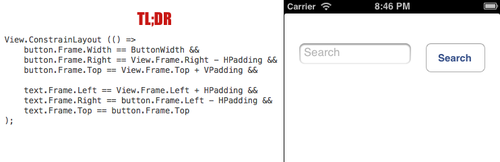
One gist of code that really makes this lovely is Frank's Easy Layout DSL - see http://praeclarum.org/post/45690317491/easy-layout-a-dsl-for-nslayoutconstraint


This expression based library let's you use simple C# statements to define your layout - it's best summarised by code - see his picture which shows how to layout a button and a text box:


For my experiments I decided to see if I could create a Fluent-style API for the same type of effect. I've nothing against the 'Easy Layout DSL' - I just wanted to learn the constraints for myself, plus I wanted to see if using a Fluent approach gave me more composability and reusability.


What I wanted to do was to see if I could define Frank's 'text and button' layout using Fluent code like:


            View.AddConstraints(
                    button.AtTopOf(View).Plus(vPadding),
                    button.AtRightOf(View).Minus(hPadding),
                    button.Width().EqualTo(ButtonWidth),
 
                    text.AtLeftOf(View, hPadding),
                    text.ToLeftOf(button, hPadding),
                    text.WithSameTop(button)
                );


It turned out that it took a bit longer than I had hoped - there were a few gotchas along the way, mainly to do with "TranslateAutoresizingMaskIntoConstraints" - but within a couple of hours I had this working :)


And once I had that working, I then started to play....


What would a form layout look like?

View.AddConstraints(
 
    fNameLabel.AtTopOf(View, vMargin),
    fNameLabel.AtLeftOf(View, hMargin),
    fNameLabel.ToLeftOf(sNameLabel, hMargin),
 
    sNameLabel.WithSameTop(fNameLabel),
    sNameLabel.AtRightOf(View, hMargin),
    sNameLabel.WithSameWidth(fNameLabel),
 
    fNameField.WithSameWidth(fNameLabel),
    fNameField.WithSameLeft(fNameLabel),
    fNameField.Below(fNameLabel, vMargin),
 
    sNameField.WithSameLeft(sNameLabel),
    sNameField.WithSameWidth(sNameLabel),
    sNameField.WithSameTop(fNameField),
 
    numberLabel.WithSameLeft(fNameLabel),
    numberLabel.ToLeftOf(streetLabel, hMargin),
    numberLabel.Below(fNameField, vMargin),
    numberLabel.WithRelativeWidth(streetLabel, 0.3f),
 
    streetLabel.WithSameTop(numberLabel),
    streetLabel.AtRightOf(View, hMargin),
 
    numberField.WithSameLeft(numberLabel),
    numberField.WithSameWidth(numberLabel),
    numberField.Below(numberLabel, vMargin),
 
    streetField.WithSameLeft(streetLabel),
    streetField.WithSameWidth(streetLabel),
    streetField.WithSameTop(numberField),
 
    townLabel.WithSameLeft(fNameLabel),
    townLabel.WithSameRight(streetLabel),
    townLabel.Below(numberField, vMargin),
 
    townField.WithSameLeft(townLabel),
    townField.WithSameWidth(townLabel),
    townField.Below(townLabel, vMargin),
 
    zipLabel.WithSameLeft(fNameLabel),
    zipLabel.WithSameWidth(townLabel),
    zipLabel.Below(townField, vMargin),
 
    zipField.WithSameLeft(townLabel),
    zipField.WithSameWidth(zipLabel),
    zipField.Below(zipLabel, vMargin),
 
    debug.WithSameLeft(townLabel),
    debug.WithSameWidth(zipLabel),
    debug.AtBottomOf(View, vMargin)
 
); 
 
... although I think there are some opportunities to shorten that code and perhaps also to use some code-based hints too!


Could I create a generic vertical scrolling StackPanel/LinearLayout?


 public static IEnumerable<FluentLayout> 
       VerticalStackPanelConstraints(
          this UIView parentView, 
          Margins margins,
          params UIView[] views)
 {
     margins = margins ?? new Margins();
 
     UIView previous = null;
     foreach (var view in views)
     {
        yield return view.Left()
                         .EqualTo()
                         .LeftOf(parentView)
                         .Plus(margins.Left);
        yield return view.Width()
                         .EqualTo()
                         .WidthOf(parentView)
                         .Minus(margins.Right + margins.Left);
        if (previous != null)
           yield return view.Top()
                            .EqualTo()
                            .BottomOf(previous)
                            .Plus(margins.Top);
        else
           yield return view.Top()
                            .EqualTo()
                            .TopOf(parentView)
                            .Plus(margins.Top);
        previous = view;
     }
     if (parentView is UIScrollView)
        yield return previous.Bottom()
                             .EqualTo()
                             .BottomOf(parentView)
                             .Minus(margins.Bottom);
 }


Adaptive!

One key thing to note about these constraint-based UIs is that they are adaptive - e.g. when you rotate the phone then the layout adapts:


The code

The code I created is currently sitting in https://github.com/slodge/MvvmCross-Tutorials/tree/master/QuickLayout/Cirrious.FluentLayout - along with a test MvvmCross project (one level up).


It may later move into an MvvmCross plugin - or into core MvvmCross - but for now it's just sitting there in Tutorials. License is Ms-PL as per normal.


A video demo - laying out a tipcalc view


More?

With all this said and done, whether or not you prefer declarative or Imperative UI code is very much a matter of taste... but one question that I'm wondering at the moment is whether I could use the same UI code to create layouts in different environments - whether the same `AtTopOf`, `ToLeftOf` type calls could be used to generate UIKit, Xaml or Axml... but that question will have to wait for another day....

Friday, July 19, 2013

Nuget, Async, PCL links

As some of you know, I'm a dinosaur.


Because of this, there isn't much coverage here of the new nuget, async and PCL toys in the very latest Xamarin Alpha and Beta releases.


If you are hungry for some nuget, async and PCL fixes, then please try:


It's looking awesome - the portable packageable async future has arrived :)


If you think, I've missed a link.... then let me know and I'll add it :)

Wednesday, July 17, 2013

N=36 - A Rio Binding Carnival :)

Today's N+1 follows on from the previous Tibet video - N=35 - which was all about Views and multibinding.


Rio Binding today is all about ViewModels.


Rio is an attempt to experiment with different types of ViewModel. In particular to:

  • use 
    • fields
    • methods 

  • instead of
    • properties
    • commands.


Using the FieldBinding and MethodBinding plugins from Rio, a view model can look like:


instead of an old-skool-INotifyPropertyChanged ViewModel like:


Rio is an attempt to start a conversation.:

  • Which ViewModel style do you prefer? 
  • Why? 
  • What else could be tried?
  • How could anyone do better?


Please note that no-one is saying that Rio field- and method-binding is better than the established property and command binding. All it does for now is to offer some new alternatives. Always think about your code and always choose the tools and techniques which suit you, your team and your app best - the app is king!


The source for today's video is at: https://github.com/slodge/NPlus1DaysOfMvvmCross/tree/master/N-36-Rio


A full N+1 index is available on:

Tuesday, July 16, 2013

If you are doing Android Mvvm and you've not looked at a ViewPager...

You *need* to watch:


Then read about it at:

N=35 - MultiBinding with Tibet - N+1 Videos of MvvmCross

Fresh from the heat and Summer-sunshine of London, today's N+1 introduces the new 'Tibet' binding engine.


This binding engine is built on top of the old 'Swiss' engine - so should be fully backwards compatible.


In addition to all the awesome syntax you had in Swiss, you can now take advantage of:
  • Multi-binding
  • Simple combination operators
  • The `Format` combination operator
  • The `If` combination operator
  • Recursive nesting of combinations and of value conversions
  • Function-style invocation of value converters

There's some good documentation on Tibet binding being authored over on https://github.com/slodge/MvvmCross/wiki/Databinding#tibet


This includes examples like:

   Value Format('Hello {1} - today is {0:ddd MMM yyyy}', TheDate, Name)

and

   Text Length(Trim(FirstName + ' ' + LastName))


Tibet has proven quite a hard topic for me to introduce... but I've had a go in this intro video:


The code for the video is at: https://github.com/slodge/NPlus1DaysOfMvvmCross/tree/master/N-35-Tibet


For a full N+1 index, see:
http://mvvmcross.wordpress.com

Friday, July 12, 2013

Badges.... Who have I missed?

Badges.... Who have I missed?


I love seeing MvvmCross improve - and the badges are a small attempt to say 'thank you' and to recognise all of the fab community contributions.


Here are all the winners so far this year - I try to include this slide in all my talks - I really can't say 'thank you' enough!


However... I'm working hard at present - working with some amazing customers across 4 continents and across far too many timezones! So I may have missed some contributions that I probably shouldn't have...


Who have I missed? 


Let me know! Nominate someone for a badge... and they *might* get one ;)

Splat awesomeness

Since April 2012 MvvmCross has been pushing PCLs forwards as a key part of the future of mobile development.

As part of this, we've produced our own plugins for things like image loading and our own abstractions for things like Colo(u)r.

One new project that's recently started is the splat project - see https://github.com/xpaulbettsx/splat

This project aims to provide more cross-platform portable low-level abstractions - like Color, Point, Rect, etc - and to provide some higher-level utilities too - like Image loading from resources.

This type of thing is obviously really useful to anyone creating PCL-based apps - so it should be really useful to anyone using, extending or building MvvmCross...

Paul Betts - this is awesome - welcome to the dystopian PCL future - a badge of portable awesomeness - thanks!


Also... while you are checking out Splat, be sure to also check out ReactiveUI too - STAR THEM BOTH TODAY!

Persistently awesome - Ninja Sudbury

As badges of awesomeness go, this is a first... this one's awarded for **persistent awesomeness**

As some of you may have already seen, the MvvmCross Ninja plugin for Visual Studio just keeps getting better.

This is all down to one person - @asudbury - he keeps churning out more and more features, fixing bugs and tracking the main project releases to make sure the Ninja is up to date.

This was particularly helpful to me as I prepared for my hour session at NDC, and for my 30 minute session at BCS Scotland. When you've only got 30 minutes for a talk and demo, it's brilliant to have a tool that generates a core project, a test project and all the UIs for Windows WPF, WIndows Store, Windows Phone, Xamarin.Android and Xamarin.Mac - all inside 45 seconds!

Adrian - sometimes known as Scorchio - Awesome Badge #3 - thanks!