The app itself is a '4 page' project that has some nice polymorphic lists driven by a slightly unusual data structure. I delivered it only on Droid and WP - and only to the proof of concept level.
You can see from the stats:
We managed to make all our code maintainable :)
The vast majority of the complex code was in the Core
Droid was particularly code light :)
WinPhone had a bit more code in it - but when I looked for it, most of it was 'boilerplate' code - code generated in App.xaml.cs
There really wasn't much code in this project - the frameworks - MS, Mono and Mvx - took care of most the work for us.
I like this new toy - will try to keep running it on all my projects :)
If you've got an existing class library, and you are wondering how big a task it will be to make it PCL, then check out this new PCL analyzer tool
It's open source (code on GitHub) and it uses reflection and the data from a spreadsheet from Microsoft's PCL team in order to tell you which non-portable APIs you are currently using.
This is really good news - it feel like the future of PCLs will include Microsoft and Xamarin working together to achieve true portability of code.
As a warning - please don't expect this to necessarily be a quick or painless ride... but do expect it to be an exciting one - and one that leads to more productive coding.
Through going portable, I predict we'll see:
- greater sharing of code and pre-built assemblies through reusable portable components
- greater sharing of code and pre-built assemblies through shared portable interfaces with platform specific implementations - i.e. things like MvvmCross plugins
- greater reliability of code - because it'll be easier to write tests for them
- greater speed of development - because people can genuinely write, test and refactor their code across the platforms
- out-of-the-box cross-platform functionality - we're already seeing this a bit - NuGet 2.3 will ship with some PCL and some MonoDroid functionality
- an explosion of platforms - really, I can't wait to see Calliburn, MvvmLight, Prism, Simple-Nancy-Mobile, Fubu-Mobile, Jounce and many more besides all joining the portable revolution - and I'll see if I can free up some of the MvvmCross code (especially the data binding) so that it can be reused more easily by some of them!
If you've ever wanted to group data together into sections within your Android listview, then Kevin Knoop - @deapsquatter - yesterday released the first of his extensions for MvvmCross to allow you to do just that:
Besides which, if ever you are after a MonoDroid control, check out https://github.com/Cheesebaron/ - from ActionBars to HorizontalListViews to SignatureCapture controls - he's got it :)
And he also sent me a Pull request with a spinner fix in it this morning :)
If you've got a complicated solution (like MvvmCross) which has lots of different projects, lots of different configurations and lots of different platforms, then check out 'Batch Build' on the BUILD menu - it helps a lot.
This is now what I use for quickly (well, fairly quickly) building MvvmCross:
As well as playing with Code Metrics, I've also had fun with the Code Map (new in VS2012 Update 1).
These views all feel a bit complex at the high level:
However, if you look at a lower level - at a class - it can help you get a feeling for what a class does and what the relationships of its methods are.
For example, here's the code map inside the new Swiss Parser:
If you want to have a play, then right-click in Solution Explorer and choose "Code Map"...
One bit of advice: I would start in a fairly small solution if you can - the "Code Map" seems to do several builds and several index operations - so on the whole of MvvmCross it can be a bit slow at times!
Over the last 3 years of MonoTouch I've seen quite a few posts about how to use the Interface Builder and then later the integrated xCode4 XIB editor in order to create UITableViewCell's for MonoTouch.
Some of my favourite XIB and cell articles have been:
This walkthrough is all about a demo Pet Shop Management app
1. Create a basic application
To start with, we have a simple MvvmCross MonoTouch app - just putting everything in one single project.
Within this basic application we have:
Core
Interfaces - defining the interfaces for our business logic
Models - some Animal classes - Kittens and Dogs
Services - some business logic - providing implementations for IAnimalSupplier and IPricingModel
ViewModels - we provide 2 simple ViewModel's here
PetShopAnimalViewModel - links an Animal to its Price and also provides ICommand's to allow the Animal to be sold and the Price to be adjusted.
PetShopViewModel - provides some ICommands to allow the pet shop owner to buy animals, and provides an ObservableCollection of PetShopAnimalViewModel's
App.cs - a very simple IoC bootstrapper registering AnimalSupplier and PricingModel singletons.
UI
Empty to start with (no Views)
A Setup.cs which just creates the App from Core, and which tells MvvmCross where to find the plugins it needs for File and for DownloadCache (both of these are used in showing images from the web).
A slightly modified AppDelegate - the modifications change the UIKit app startup so that it will create a Setup.cs instance and will then ask MvvmCross to 'NavigateTo' a PetShopViewModel.
Notes:
I never write commercial apps this way - for commercial apps I split the logic out into testable, reusable PCL class libraries - but for demo, this approach is OK here.
The ViewModels here contain too much logic - normally, you'd put the logic in a Model or Service behind the ViewModel - but for demo, this approach is OK here.
2. Create a Kitten Cell
We want a UITableViewCell which will be used to display Kittens when they are in a Table
2.1 Create a C# class
In order to create the Kitten Cell, the first thing we do is to create an empty class, KittenCell.cs
In that class, we then:
Make the class partial
Change the inheritance of the class to MvxBaseBindableTableViewCell
Add a [Register("KittenCell")] attribute - registering the cell with iOS/UIKit
Add a NSStringIdentifier for cell reuse
Add an empty BindingText constant string
Change the default constructor so that it passes BindingText to base
Add a IntPtr constructor which passes BindingText and the IntPtr to base
This should create something that looks like:
2.2 Create a KittenCell XIB
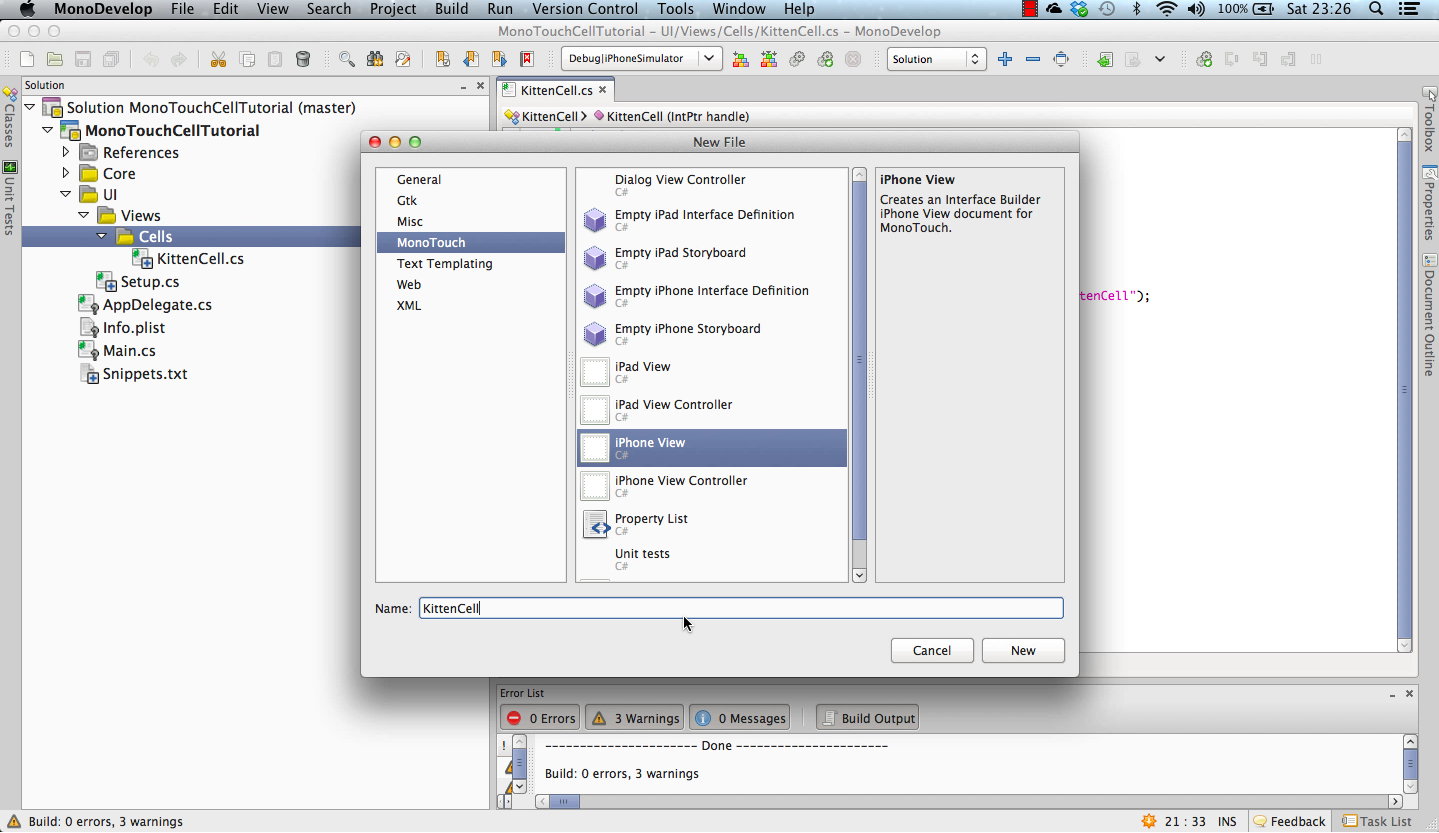
With the KittenCell.cs class created, then we can now create an XIB. To do this we use one of the iPhoneView or iPadView templates in File|New - doesn't matter which we choose - they both just create an XIB for us:
2.3 Replace the KittenCell XIB contents with a TableViewCell
With that XIB created, double-click it to open it in xCode4.
It will look like a full page...
We don't want a full page - so we delete it.
Then we use the library (bottom right) to drag a Table View Cell on to the design surface instead:
2.4 Link the TableViewCell back to the KittenCell
We now want to link this Table View Cell back to our C# class - the one with the [Register("KittenCell')] attribute.
To do this we use the Custom Class property:
NOTE: the xCode property editor has a nasty little trick of losing things you enter into text boxes - to avoid this, please make sure you switch the focus away from text boxes before you change tabs within the property inspector.
2.5 Set the reuse Identifier to KittenCell
This is easily done using the ReuseIdentifier field - this needs to be set to the same as our NSString Identifier used in C# earlier:
Note: generally, I just recommend trying to keep all your names aligned - if you use "KittenCell" for all of the file name, the reuse identifier, the XIB name, etc, then you will find it easier to avoid slippy-finger-typo mistakes.
2.6 Place subviews and set their properties in order to create your cell layout
This walkthrough isn't about how to use the XIB editor itself...
It's just drag/drop and property setting...
So I'll just fast forward to the cell I created:
2.7 Open KittenCell.h in the Assistant Editor
Because of the work we did in 2.1 when we created our C# class, and because of some magic that the Monkeys inside MonoTouch and MonoDevelop do for us, then Xcode will have a file called KittenCell.h available.
To see this file, highlight the TableViewCell in Objects (left middle), and then choose View|Assistant Editor|Show Assistant Editor in the menu.
The Assistant Editor will show the KittenView.h file like:
2.8 Create Outlets for the subviews we've created
As far we we're concerned here, Outlets are just links from the XIBs back to private C# properties back in our KittenCell.cs class.
To create them, choose one of the following mechanisms in order to find the "New Referencing Outlet" option:
Right-click (or Ctrl+Click) on the child view in the Objects pane
... or ... Right-click (or Ctrl+Click) on the child view in the design surface
... or ... Select the child view in either the Objects pane or the design surface, and then choose the Outlets tab of the Properties pane
Once you've done this you can then drag the + across from the "New Referencing Outlet" into the KittenCell.h file shown in the Assistant Editor:
When you drop this link, you will be asked for a name - use a sensible C# Property name - e.g. KittenImageView for a UIImageView which we will use to show the Kitten's Image from the web:
Once we've done that for all the subviews in our current design, the Xcode display should look a bit like:
2.9 Back to MonoDevelop and C# - a designer file
By this stage, our Cell is pretty much finished :)
So now, we need to choose File|Save in Xcode.
Then we can switch back to MonoDevelop.
When you do, you'll notice that MonoDevelop is a bit sluggish to respond...
... and if you look at the status bar, then you may see some messages about things like 'Updating from Xcode'
After a couple of seconds this sluggishness will end, and you'll notice that the Xamarin monkeys inside MonoDevelop have now created a KittenCell.designer.cs file which contains properties which map to the Outlets we created in the designer:
2.10 Bind the UI to the ViewModel
In this walkthrough, we simply add some C# public properties and some simple MvvmCross Swiss-format binding text to hook up the C# cell to these properties.
This creates code like:
Notes:
we haven't hooked up the UIImageView yet - we'll do that 'soon'
we have just used very simple int and bool Properties here in our KittenCell for things like Price and IsLitterTrained. In full maintainable code, I would often use ValueConverter to help with some of these - but that's a separate article.
If you aren't using MvvmCross, then you'll have to replace this step with some alternative - e.g. you could just use some kind of SetKitten(Kitten kitten) method which you can code to set the UILabelproperties like Text, Hidden, etc.
3. Add a DogCell
To add a second type of cell, we just repeat the same steps...
At the end you'll end up with something like:
With C#
4. Adding the 'View' UIViewController - again using XIBs
We now have our:
Core code with Models, Services and ViewModels
KittenCell - XIB and C#
DogCell - XIB and C#
So the next step is setup a 'Page' or 'Top Level View' - an MvvmCross 'View' to show a UITableView in which we'll list the pet shop's Stock.
4.1 Create the iPhone UIViewController
Use File|New in MonoDevelop to create an iPhone View Controller called PetShopView
This will create a UIViewController - which is three files:
PetShopView.cs
PetShopView.designer.cs
PetShopView.xib
However, because we're using MvvmCross with binding, we want to change this to an MvxBindingTouchViewController
To do this we edit PetShopView.cs so that:
the class inherits from an MvxBindingTouchViewController templated on a PetShopViewModel
the constructor in so that it uses an MvxShowViewModelRequest.
4.2 Design the UI - edit the XIB for the PetShopView
Double-click on PetShopView.xib in order to open the XIB in Xcode.
This time, we will keep the basic 'full page' layout handed to us by the wizard.
For content design, we'll then add two subviews - a UIButton at the top and a UITableView beneath.
If you watch the video, you'll also see how we 'dock' these so that the UI can be used on 4" iPhones as well as 3.5" ones.
4.3 Create an Outlet... and also an Action
Within Interface Builder (Xcode) we can use the Assistant View again along with Right-Clicking in order to add:
an Outlet for our UITableView called TableView
an Action for the UIButton sent event TouchUpInside called AddButtonClicked
With this done, our interface design is complete - so choose File|Save in Xcode
4.4 Back to MonoDevelop - let the Monkeys generate a designer file
Switching back to MonoDevelop, you'll see another short delay while the Xamarin Monkey's do their wonderful work.
They'll regenerate the PetShopView.designer.cs file for us - and it will now contain:
Note that the Action has been integrated as a C# partial method - these are 'optional' methods in C# partial classes. This is not a commonly used language feature - well, I've never used them much - but they're a very nifty way of working here with these Interface Builder actions.
To handle the Add, we simply implement the partial Action method in our main PetShopView.cs class file.
In this sample we choose to implement this using an UIActionSheet:
4.6 Implementing the TableSource
All UITableView's need a UITableViewSource to supply their data and their cells.
In our case we add this using:
A nested class that inherits from MvxSimpleBindableTableViewSource
During its constructor
This source uses tableView.RegisterNibForCellReuse to register the KittenCell and DogCell XIB files (these get compile to NIB files)
This source also sets up some simple animations which happen during adding and removing cells - these animations are automatically triggered from ObservableCollection.
The Source overrides GetOrCreateCellFor
in order to select the correct cell type Identifier based on the data to display
and then uses tableView.DequeueReusableCell() in order to ask the UITableView to either get a new cell or to reuse a pooled one.
The class also overrides GetHeightForRow in order to accommodate our different cell heights.
In code this is:
Note: this code may surprise semi-experienced MonoTouch developers. The reason is because these particular overloads of RegisterNibForCellReuse and DequeueReusableCell calls were new in iOS6.
We now need to hook the TableSource up to the UITableView from the XIB, and to the StockObservableCollection from the PetShopViewModel
To do this, we just add some code to the PetShopView's ViewDidLoad method:
5. Run!
Finally we have our complete:
Core - with Models, Services, ViewModels, App
UI - with DogCell, KittenCell and a PetShopView
When we hit 'Run' we can see our UI and we can interact with it to add Kittens and Dogs:
Note that the Dogs and Kittens are displayed in different Cells with different heights:
6. Adding Images and UI for the PetShopAnimalViewModel ICommands
I'm not going to go through this in detail - you can watch the video if you need detail.
All I will say here is that:
we can now iterate over our XIB design and our CS code.
for images we can add an MvvmCross helper object - MvxDynamicImageHelper using UIImage - which can fetch the HTTP images for us
for the ICommand's we can use auto-properties on the Cell combined with Interface Builder Actions for button presses.
For KittenCell, the interface and code that this editing creates is:
7. A Finished Sample
With everything completed, we now have:
testable, reusable business logic
a UI generated from XIBs
including Cells
including a PetShowView 'Page'
dynamic delightful behaviour including simple animations and touch interaction
----
Want to know more?
I hope this walkthrough has been comprehensible - and fairly well self-contained.
----
If you have read, then it might be worth watching too - as I work I do talk about some problems I sometimes encounter - and you get to see some genuine problem solving while I talk.
----
If you want to know more about MonoTouch - or about iOS coding - then I recommend http://xamarin.com - their documentation team is superb.
Indeed, much of what I've learnt about how to use Tables, Cells, and Sources came from Mike Bluestein's articles, blogs and videos - thanks Mike!
This walkthrough is all about UITableViewCell and UITableView.
However, the same techniques can be used for the newer UICollectionViewCell and UICollectionView - and these CollectionViews are one of my current favorite toys - I love them!
Further, very similar techniques can be applied for any UIView you might want to load from an XIB rather than from code.
-----
If anyone from MonoDevelop or Xamarin reads this...
There are some things you could do to which might make this process easier....
publish some additional UIView/XIB File|New templates which produce the partial classes and XIBs together (possibly even generating combined iPhone and iPad XIBs)
consider creating the Outlets as internal or public - then I can more easily bind to them in MvvmCross
consider changing the generated Actions to internal or public ICommands or EventHandler delegates - then I can bind to them more easily :)
provide some buttons or menu options that allow me to manually request Xcode file regeneration (in both directions)
publish more documentation on this - to replace this shambles of an effort :)
I will blog more fully about this soon... and I will add some CollectionView as well as TableView code... but in the meantime, here's a screenshot and the code behind it:
Special thanks due to Mike Bluestein for his Xaminar on iOS6 and UICollectionViews - I learnt a lot watching and listening to it - http://dotnetmobilepodcast.blogspot.co.uk/2012/11/introduction-to-collection-views-in-ios.html - and need to watch it a few more times yet!
More details in a more detailed blog post "coming soon"...
Original:
----
As I'm sure many of you know, binding in MvvmCross is declared using JSON syntax - parsed using the PCL version of the wonderful JSON.Net
I love this JSON binding syntax - as it's reliable, robust, easy to learn, and because it gave me a powerful parser (including things like character escaping) for "free".
However, over the last few months, there have been a few suggestions about ways to make the binding syntax more readable for MvvmCross on Droid and Touch
The old reliable, well-documented JSON syntax is still available
Or you could quite quickly write your own syntax too… the source is there if you want to try and Dependency Injection gives you an easy way to inject your implementation…
He's also posted the code as a pull request - but I'm not pulling at the moment because there are some blocking problems with PCLs in Xamarin.Mac - https://bugzilla.xamarin.com/show_bug.cgi?id=9163 - will pull as soon as we can get these sorted :)
Kevin Knoop - @deapsquatter - wow - thanks - definitely an MvvmCross Badge of Awesomeness!
For the last couple of weeks I've been kicking off a new big project - it's top secret for now so I can't tell you much about the actual contents of it…
What I can say, though, is that it's an MvvmCross project built on top of all of WinRT, WP7/8, Mono for Android and MonoTouch.
It's being built with a .Net dev team - some young guys who've clearly got a lot of Win8 and WinPhone expertise and who also know their ASP.Net Mvc, know their Umbraco and know a wide breadth of Azure too - not just web and blob, but also more specialist things like the shiny new Media Service APIs.
----
So why am I teasing and boring you with this information?
Well, because it's **good news**.
It's been really interesting to step back and become a user of MvvmCross - to be working with some great .Net devs who've not seen MvvmCross before, and to experience some of the plans and pleasures of kicking off a new project. It's also been very interesting to find myself writing more of the iOS/MonoTouch code - spending more time in MonoDevelop and trying afresh to use things like the XIB designer in xCode.
----
What have I learnt:
1. The MonoTouch MvvmCross support had definitely slipped behind the other platforms a bit - a situation I've started to rectify by revisiting some of the View classes - especially things like Image, Table and Collection. I think we've now got already got much better support for those - and I'll be sure to keep doing more code and more samples in MonoTouch again from now on.
2. There are some pain points in setting up MvvmCross cross-platform - especially with all the nonsense surrounding PCLs. However… I've been really impressed with the fact that the professional devs I've been working with have just gotten on with it. If there's a 10 minute setup and that setup requires manually fixing something like the PCL build path on the Mac, then they just do it - and then they get on with coding their app.
Of course, one potential problem here could be the risk that 10 minute setup tasks can go wrong - and if 10 minutes ever turns into an hour or worse, then that's when there's a risk of the dev just giving up…
Clearly, Iweneed to think about this…. and we need to up the quality of the documentation and the setup instructions. If anyone else wants to help with this - especially by blogging about how they've got things working - and how they've solved any issues - then please do. If you share information that helps other devs get started, then 'the law of averages' (or Karma) will one day complete the circle - one of those devs will one day maybe post a sample, answer a stackoverflow question or somehow produce something that helps you out…
3. C# devs need resharper. Really they do. And if you're consuming code written using resharper, then that's doubly true.
For example, the number of namespaces inside MvvmCross… means Alt+Enter for resolving namespaces is really needed!
If you don't have devexpress or resharper or similar, then buy it for your dev work today - it'll pay you back inside a couple of weeks (if not sooner)
4. The Mono toolflow isn't as good as VS2012 with Resharper.
However…. it is actually really rather good :)
MonoDevelop has come a long way since I first used it 3 years ago - the built-in editors, intellisense, refactoring, designers, debugger, etc are all good - and even sometimes excellent. Obviously as a PC user I sometimes feel lost with the mac keystrokes… but the reverse is also happening - it's not that unusual to find me missing some of the Mono tools when I switch back to the PC….
Also, things like the XIB integration on MonoTouch are pretty good at the moment - I can design dynamic data-bound resizing new UICollectionViewCells really quickly and nicely right now. I'll post some blog posts on this soon!
5. MvvmCross really needs a build server and a binary distribution… I'm still working out how to do this - bear with me…. or volunteer to help!
6. The overall approach of MvvmCross/MonoTouch/MonoDroid/WindowsPhone is really good for dev - and it's really quick for existing Mvvm devs (from Prism, MvvmLight, Calliburn, etc) to pick up.
I really very much LIKE the way MvvmCross encourages users to separate out their code - it encourages us to use IoC, it encourages us to write tests, and it allows us to spend our time worrying about our code architecture. Really, this has been eye opening to me… it's reminded me of why we started using a framework in the first place.
---
So that's it. I just wanted to blog what I've learnt these past few weeks. It's basically a BIG THANKS to the dev team I'm working with - they've taught me heaps; and the project and team have helped me fall back in deep, deep love with MvvmCross again.
----
Now enough of that…. back soon to talk about some new features and more for the future :)
I've just received this advice from AlphaPage about how to avoid the very slow loading (3 to 4 hours) of the MvvmCross solution when using VS2012 with VSMonoTouch...
It's definitely deserving of....
Awesome - thanks - AlphaPage!
Hello,
If you want to quickly open the solution in VS2012 for the first time or when you rename the solution folder, here is how I do:
in Run dialog box, open : "C:\Program Files (x86)\Microsoft Visual Studio 11.0\Common7\IDE\devenv.exe" /safemode
open the solution (VS2012 will load Console or wpf projects only because of safemode)
close VS2012
open the solution in "normal mode"
reload projects in each folders except Samples folder
You are done within less than 5 minutes.
If you want to open projects in Samples folder, disable VS2012Monotouch addin, restart VS2012 and proceed.
Then enable VS2012Monotouch addin, restart VS2012 and load the Touch UI project only when needed.
Why?
Touch library load quickly (no problem), but Touch UI project uses IphoneSimulator or Iphone configuration instead of AnyCpu.
I don't know why those projects are so slow to load, but if you change config to AnyCpu the project loads quickly (bug 1).
But another problem is if you don't unload all Touch UI projects, any
project (even non Touch UI project) will reload very slowly (bug 2).
I mean if all UI Touch projects are unloaded, you can unload/reload
other projects quicly except UI Touch project of course. But as soon as
you load 1 UI Touch project, loading/unloading another project except UI
Touch project becomes very slow.
Finally, I suspect VS2012 to reload all (or some) projects each time
you reload 1 project resulting in cascading reloads and unnecessary
loops (bug 3).
When you open the project for the first time, another feeling is that
VS2012 is also waiting for some dialog box results in the background
delaying the process depending on a timeout foreach dialog, but this is
my opinion.
Anyone who wants to help with reporting the slowness of VSMonoTouch inside VS2012 to Microsoft. The slowness seems to be to do with the number of configurations.
If you want to help, then you can run the same steps I'm going to - getting multiple traces may help nudge MS along :)
To use the tool: 1. Install the feedback tool (restart VS) 2. Load the solution 3. Choose "Report Bug" on the help menu (login with Live ID) 4. Choose existing feedback, and enter this bug number (775466) 5. Choose "Performance" from feedback type 6. Close the solution 7. Open the solution 8. Stop recording and submit the bug
Be sure to open the solution before choosing "Report Bug" to ensure we get details about the solution itself.
Thank you for your help.
You may receive a general "Feedback Item Updated" notification as well, if any other changes were made by Microsoft.
Thank you for using Microsoft Connect!
I will run the tool - but if others want to as well, then please do :)
I'm sure that those who've followed the mvvmcross story so far are already well aware of my ongoing campaign to get more and more portable class library code running across all the Mono platforms - Touch, Droid, Mac, PSVita,... :)
One thing I'm worried I may have mis-stated recently is the binary compatibility of portable class libraries right now.
It is true that I've successfully used the portable Newtonsoft JSON.Net as a binary across a lot of platforms - and it's worked well for me - that's what I meant to state.
What I shouldn't have implied was that all portable binaries will work well for you - they won't... not yet...
For mvvmcross binaries, in particular, please do *not* try to use the MvvmCross dlls built on Windows (for WP, WinRT and MonoDroid) on the Mac for MonoTouch. These sadly, don't work, because:
Instead... you must build the portable libraries for MonoTouch instead....
If you don't want to build - if you want an unofficial set of debug binaries instead... then today these sit in a skydrive folder: http://sdrv.ms/URCbYN - note that there are two portable folders: portablePC for VisualStudio projects and portableMac for iOS MonoDevelop projects.
Some new year's resolutions for you:
I will try to work on getting official releases of mvvmcross out and published
I will try to get these released via nuget too
I will keep reporting issues to MS and Xam about PCLs - in the hope this leads to better and better support.
Sorry, the PCL situation isn't yet really good. The situation today is way better than it was a year ago... but there's definitely still things to do!
If ever you want to override the default viewmodel-view lookup setup, then you can do so by overriding the GetViewModelViewLookup method in your Setup class.
The default lookup table is generated by:
enumerating all the Types in the Setup.cs Assembly
removing any which don't implement IMvx-platform-View
removing any which are abstract
removing any which start/end with the word Base
removing any which are marked with the Unconventional attribute
removing any which are marked with the ConditionalConventional attribute and who's condition fails (this is used for e.g. iPad vs iPhone selection - see Sharing ViewModels for different Views)
finding the ViewModel property on each remaining Type
removing any who's ViewModel PropertyType starts/ends with the word Base
removing any who's ViewModel PropertyType is an interface
listing the remaining {ViewModel PropertyType, View Type} as a Dictionary lookup.
If you wish to replace this algorithm, you can - just override GetViewModelViewLookup
For example, at a trivial level, you could just hard code the ViewModel-View list:
This hard-coded list is actually what the very first versions of MvvmCross did - and it does have a small performance advantage - it makes app startup a bit quicker.
For a slightly more complicated example, you could generate an alternative list based on several assemblies, and could then supplement that list with some conditional logic:
One of the questions that has come up a few times on StackOverflow is about why MvvmCross insists on using Strings for ViewModel navigation parameters.
one of the things I don't like is that i'm just passing
these anonymous objects around with magic properties
would prefer to have a class for the parameters to a view model and just pass that in
would also make it much more resistant to refactoring too
This seemed like a very reasonable request.... and the good news is that you can add this yourselves by:
overriding the way navigations are requested
and overriding the way ViewModels are located.
Here's one way to achieve this:
First, create the base type for all your navigation parameter objects
Then modify your BaseViewModel (or ViewModelBase) in order to allow it to support this parameter object navigation
Now modify each of your view models so that they have a new NavigateTo method - which either take no argument or which take a class derived from NavigationParametersBase:
Now, create a default ViewModelLocator which can deserialise the incoming NavigationParameters and can initialise the ViewModel:
Note that this method uses a new deserialise method - only just added: https://github.com/slodge/MvvmCross/commit/f329a2ee6b68809060a52674b924549156d8c9b1
Finally, to make sure that the locator is used, override CreateDefaultViewModelLocator in your MvxApplication:
That's it.
Obviously, there's more that could be done - and different ways in which the ViewModel could be initialised - but this is a basic start which others can build on if they want to.




It's definitely deserving of....