Thursday, September 19, 2013

N=37 - Maps and Zombies part 1 - N+1 Days of MvvmCross

After a slightly longer than planned summer break, I'm finally returning to these recordings. Sorry about the elongated break, but I'm back now, and hoping to cover some more advanced topics :)


To start with, I thought I'd try some mapping. This is going to take a few videos to get completed.... just easing back into this process.


First up:

  • we create just a PCL and an iOS project
  • we add an MKMapView view
  • we databind some annotations to the ViewModel

The video for this is:


I'm afraid I did get interrupted during the recording, so you might hear someone asking if I wanted a beer - but I didn't - I don't drink and screencast ;)


The code for this is in: https://github.com/slodge/NPlus1DaysOfMvvmCross/tree/master/N-37-Maps


The index of N+1's is on http://mvvmcross.wordpress.com, but we also have a copy on the wiki - https://github.com/slodge/MvvmCross/wiki

Sunday, September 15, 2013

Awesome issue hunting and fixing from @brianchance

Over the last coupe of months we've had some awesome fixes sent to us from Githubber Brian Chance

These have included a big project tidy up to help us remove "System.ServiceModel" references and an important fix for our MonoTouch.Dialog port - which has helped us work out some long-standing issues with StyledStringElement.

Small fixes and pulls like these are awesome - keeping on top of issues like this is really core to MvvmCross - it's awesomely important.

Brian - a huge thanks to you ... and a badge of awesomeness - thank you!


PullToAwesome - an awesome MvxUIRefreshControl from James Montemagno

Implementing Pull-To-Refresh in iOS is lovely and simple... and now with this gist from James Montemagno (@jamesmontemagno) databinding that Pull-To-Refresh is really simple too.

Read more about this on:

- James' blog - http://motzcod.es/post/59125989518/mvxuirefreshcontrol-for-mvvmcross
- the Gist - https://gist.github.com/jamesmontemagno/6323125

Simple, Beautiful... and Awesome... it earns James his first badge of awesomeness - thanks for the awesomeness :)


Shinobi Charting with MvvmCross applied - awesome from SammyD

SammyD - also known as @iwantmyrealname - recently posted an awesome blog post and an open source repo on how to combine the very sleek and sexy Shinobi charts with Mvvm on Xamarin.iOS.

You can read more about this on http://www.shinobicontrols.com/blog/posts/2013/09/04/mvvm-charting-with-shinobicharts-and-mvvmcross


It's an awesome read - with an awesome open source repo behind it. Thanks @iwantmyrealname - very well deserving of a badge of awesomeness - thanks!


An awesome plugin to allow integration with Azure Access Control - from the @CheeseBaron

Microsoft's Azure ACS provides big cloud identity services.

It's got a wide range of uses - it's useful for new apps wanting to integrate with Google, Facebook, and Live authentication and for companies wanting to authenticate with established Active Directory servers.

The great news is that @Cheesebaron has provided a MvvmCross plugin to allow your apps to integrate with it - he's built it for Xamarin.iOS, Xamarin.Droid and WindowsPhone - and he's made it available open source at https://github.com/Cheesebaron/Cheesebaron.MvxPlugins/tree/master/AzureAccessControl

This is, of course, AWESOME .... and it bags @Cheesebaron his 4th badge of awesomeness - thanks Tomasz for all the awesomesauce :)


Sunday, September 08, 2013

3.0.12 pushed to MvvmCross-Binaries (not quite on Nuget yet)

I've just pushed build 3.0.12 to https://github.com/slodge/MvvmCross-Binaries/

It will appear on Nuget when I can work out what's broken on https://nuget.codeplex.com/discussions/456158 (apparently this is a nuget.org problem - and should be fixed tomorrow)

This build is pretty similar to the 3.0.11-beta build that I know many of you have been using for the last week.

This is the first build to be linked against the new 'async' and 'PCL' Mono 3 based releases from Xamarin.

There seems to be some issues with the latest releases from Xamarin - especially concerning https://bugzilla.xamarin.com/show_bug.cgi?id=14520 - so other patches may follow soon.


Possible breaking changes in 3.0.12 are:
  • Updates for Xamarin PCL support - iOS apps must now use the Mono 'System.Windows' PCL shim and not the ones previously supplied by MvvmCross.

    This Mono 'System.Windows' assembly should be present in the 'Add Reference...|Assemblies|Framework' list after you have connected Visual Studio to your Mac and have synced the SDK. However, I have personally had some issues with this (sometimes it has asked me to sync every few minutes...)

    Using this Mono Shim may report in some 'warnings' about different strong-named System.Windows assemblies during linking from the MonoTouch compiler - but these warnings (so far) seem to result only in slightly slower link times.
  • Updates for Xamarin PCL support - all PCL projects should currently build as Profile 104 on both PC and Mac (previously we had to specify 'Profile1' for Mac support)
  • The default constructors in the MvvmCross Dialog port of StyledStringElement now match the main MonoTouch.Dialog implementations - this clears #402 and#328 but may effect any users currently relying on the current implementation (to workaround any problems, use the constructor which allows cell type to be specified)
 
Other noteworthy changes for MvvmCross in 3.0.12 are:

  • small changes to unify `Adapter` configuration across all Android list-based views (all can now be passed null in the constructor) - #390
  • small fix in Email plugin for empty cc field - #385
  • a new `IMvxViewModelByNameRegistry` interface which allows plugins to register ViewModels if they want to - #405
  • StyledStringElement Visible implemented - #403


As an aside... some of you may be wondering what happened to 3.0.11? It kind of got confused in the build process... so I decided to clean and build 3.0.12 instead - sorry!

Thursday, July 25, 2013

Xamarin 4.8 Stable... not sure....

If any MvvmCross get asked today if they want to upgrade to 4.8, then my advice is "wait"


Unfortunately, if you do a fresh install on a Mac, then try the sequence "File->New->Portable Class Library" then that library will not build. The build gives lots of errors about "predefined type XXX is not defined or imported"


I think this will probably be easy to fix - it will probably be down to the PCL reference assemblies - but until some brave leading-edge adventurers have worked this out, then it might be wise to "wait" and not to install the 4.8.0 version


 Hopefully soon this will get resolved - then we can async/await :) :) :)


Wednesday, July 24, 2013

Map Annotation DataBinding

From my answer to http://stackoverflow.com/questions/17816684/using-mvvmcross-how-can-i-bind-a-list-of-annotations-to-a-mapview/17834923#17834923


Subscribing to changing collections is one of the corner-stones of Data-Binding and relies on a little knowledge of the INotifyCollectionChanged interface.

Within the MvvmCross source, there are a few example classes which show how to subscribe to collections and their change notifications - e.g. MvxViewGroupExtensions.cs in Droid and MvxTableViewSource.cs in Touch

The core to the technique is to create an Adapter or Source object which listens for changes either in the whole list or to parts of the list and which takes action accordingly.

The same type of approach applies for maps with multiple - but markers - although we don't yet have any helper classes for this.


Without actually having a Mac or iOS device to hand, here are roughly the steps I'd take to create a wrapper...

Assuming I had a Model object like:

public class House
{
    public double Lat { get; set; }
    public double Lng { get; set; }
    public string Name { get; set; }
}

Inside a ViewModel like:

public class FirstViewModel : MvxViewModel
{
    public ObservableCollection HouseList { get; set; }
}

With this done, then in the View we can create an annotation class for each House - e.g. something like:

public class HouseAnnotation : MKAnnotation
{
    public HouseAnnotation(House house)
    {
        // Todo - the details of actually using the house here.
        // in theory you could also data-bind to the house too (e.g. if it's location were to move...)
    }

    public override CLLocationCoordinate2D Coordinate { get; set; }
}

We could then create a HouseAnnotationManager who's responsibility would be to manage the translation of changes in the HouseList being mapped to changes in the annotations being displayed on the map.

To do this, we would give the manager methods to:
  1. Create a single annotation:

    private MKAnnotation CreateAnnotation(House house)
    {
        return new HouseAnnotation(house);
    }
    
    
  2. Add an annotation to the map (and to a local lookup table)

    private void AddAnnotationFor(House house)
    {
        var annotation = CreateAnnotation(house);
        _annotations[house] = annotation;
        _mapView.AddAnnotation(annotation);
    }
    
    
  3. Remove an annotation from the map (and from a local lookup table)

    private void RemoveAnnotationFor(House house)
    {
        var annotation = _annotations[house];
        _mapView.RemoveAnnotation(annotation);
        _annotations.Remove(house);
    }
    
    
  4. Do the same actions for lists:

    private void AddAnnotations(IList newItems)
    {
        foreach (House house in newItems)
        {
            AddAnnotationFor(house);
        }
    }
    
    private void RemoveAnnotations(IList oldItems)
    {
        foreach (House house in oldItems)
        {
            RemoveAnnotationFor(house);
        }
    }
    
    
  5. Respond to INotifyCollection changes:

    private void OnItemsSourceCollectionChanged(object sender, NotifyCollectionChangedEventArgs e)
    {
        switch (e.Action)
        {
            case NotifyCollectionChangedAction.Add:
                AddAnnotations(e.NewItems);
                break;
            case NotifyCollectionChangedAction.Remove:
                RemoveAnnotations(e.OldItems);
                break;
            case NotifyCollectionChangedAction.Replace:
                RemoveAnnotations(e.OldItems);
                AddAnnotations(e.NewItems);
                break;
            case NotifyCollectionChangedAction.Move:
                // not interested in this
                break;
            case NotifyCollectionChangedAction.Reset:
                ReloadAllAnnotations();
                break;
            default:
                throw new ArgumentOutOfRangeException();
        }
    }
    
    
  6. Respond to whole list changes:

    // MvxSetToNullAfterBinding isn't strictly needed any more 
    // - but it's nice to have for when binding is torn down
    [MvxSetToNullAfterBinding]
    public virtual IEnumerable ItemsSource
    {
        get { return _itemsSource; }
        set { SetItemsSource(value); }
    }
    
    protected virtual void SetItemsSource(IEnumerable value)
    {
        if (_itemsSource == value)
            return;
    
        if (_subscription != null)
        {
            _subscription.Dispose();
            _subscription = null;
        }
        _itemsSource = value;
        if (_itemsSource != null && !(_itemsSource is IList))
            MvxBindingTrace.Trace(MvxTraceLevel.Warning,
                                  "Binding to IEnumerable rather than IList - this can be inefficient, especially for large lists");
    
        ReloadAllAnnotations();
    
        var newObservable = _itemsSource as INotifyCollectionChanged;
        if (newObservable != null)
        {
            _subscription = newObservable.WeakSubscribe(OnItemsSourceCollectionChanged);
        }
    }
    
With this all written, then your ViewModel can have a private _manager field and can create and data-bind it as:

        _manager = new HouseAnnotationManager(myMapView);

        var set = this.CreateBindingSet();
        set.Bind(_manager).To(vm => vm.HouseList);
        set.Apply();


Overall, this might look something like: https://gist.github.com/slodge/6070386

Disclaimer: this code hasn't been compiled let alone run, but the approach is basically correct (I think)


The same basic approach should also work in Android - although in Android you'll also have to fight a battle against the setup - Ant, Google Play v2 and all that jazz.


If you wanted to do further map manipulations - e.g. changing the map center and zoom when a house is added, then this can obviously be done from within overrides of methods such as AddAnnotation within your manager.


The full gist is:

Tuesday, July 23, 2013

MvvmCross 3.0.10 binaries released to nuget, GitHub and skydrive

3.0.10 is a fairly small release - just a few small patches to 3.0.9 from 10 days ago.


I really hope this might be the last release before we switch to Xamarin official PCLs - I might even label those releases 3.1.x


The list of 3.0.10 changes is:
  • minor nuspec file fix - ResourceLoader now availble for WPF
  • a DataContext is now non-virtual everywhere - this may be a breaking change for anyone who was overriding it in their tableviewcells, in an MvxView or in a MvxFrameControl. The recommended solution for the breaking change is to use Binding for all DataContext changes.
  • UIDatePicker now has a "Time" binding - can be used to bind to  a TimeSpan - see ApiExamples project for use
  • In order to support textbox to decimal number binding (see #350), we've changed the binding layer so that:
    1. source (viewModel) bindings do not update the ViewModel if the new value Equals the existing value
    2. for the specific cases of double, float and decimal source values the target bindings do a text-numeric equivalent comparison before setting the UI
  • Fixed "whole object" binding which was broken in 3.0.9 by the Tibet binding changes - the workaround for this in 3.0.9 was to use a period "." for the whole object path (see http://stackoverflow.com/questions/17729282/error-when-making-bind-observablecollectionstring-for-a-mvxlistview/17729996#17729996)
  • Minor changes to design time helpers for Visibility and Color
  • Fixed the MvxPickerViewModel to allow its choice list to be updated dynamically (#354)
  • Groups of Bindings can now be removed from a BindingContext using a ClearKey. To specify the ClearKey for FluentBinding, use the `.WithClearBindingKey(key)` extension (linked to http://stackoverflow.com/questions/17680846/mvvmcross-clearbindings-how-to-use-in-touch and #358)

I've run this build against our unit tests (more still needed), against a significant chunk of the MvvmCross-Tutorials samples, and against some 'new project' tests. All seemed good :) Hopefully this release hasn't broken too much .... as I'm off on holiday real soon :)

Monday, July 22, 2013

Playing with Constraints - FluentConstraints and FluentLayouts for Xamarin.iOS

Update: code now fully shared at https://github.com/slodge/Cirrious.FluentLayout


If you've watched any of the N+1 series - http://mvvmcross.wordpress.com/ - then you'll no doubt have seen me writing a lot of repetitive, error-prone layout code like:


       var textView = new UITextField(new RectangleF(10, 100, 300, 30));
       Add(textView);
       textView.InputView = picker;
       var label = new UILabel(new RectangleF(10, 130, 300, 30));
       Add(label);


All of this repetitive, error-prone layout code was... of course... unnecessary.  The problem was that I am a dinosaur and sometimes it takes me time to learn what I should be doing...


iOS6 is now almost a year old - and part of iOS6 was a new layout system called constraints. The basic idea behind these constraints is that it allows you to specify relationships between the layouts of UIView objects and their attribute values- so that you can, for example, ask one view to set its Top equal to the Bottom of another view. When you do this, then iOS/UIKit will then try to work out the layout for you at runtime.


I've been playing with these today and they are fabulous - especially when coupled with the power of C# - expect to see more of them in my demos soon!


One gist of code that really makes this lovely is Frank's Easy Layout DSL - see http://praeclarum.org/post/45690317491/easy-layout-a-dsl-for-nslayoutconstraint


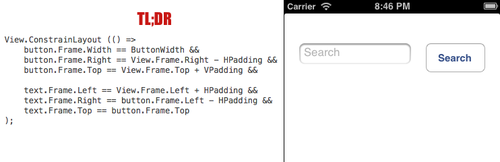
This expression based library let's you use simple C# statements to define your layout - it's best summarised by code - see his picture which shows how to layout a button and a text box:


For my experiments I decided to see if I could create a Fluent-style API for the same type of effect. I've nothing against the 'Easy Layout DSL' - I just wanted to learn the constraints for myself, plus I wanted to see if using a Fluent approach gave me more composability and reusability.


What I wanted to do was to see if I could define Frank's 'text and button' layout using Fluent code like:


            View.AddConstraints(
                    button.AtTopOf(View).Plus(vPadding),
                    button.AtRightOf(View).Minus(hPadding),
                    button.Width().EqualTo(ButtonWidth),
 
                    text.AtLeftOf(View, hPadding),
                    text.ToLeftOf(button, hPadding),
                    text.WithSameTop(button)
                );


It turned out that it took a bit longer than I had hoped - there were a few gotchas along the way, mainly to do with "TranslateAutoresizingMaskIntoConstraints" - but within a couple of hours I had this working :)


And once I had that working, I then started to play....


What would a form layout look like?

View.AddConstraints(
 
    fNameLabel.AtTopOf(View, vMargin),
    fNameLabel.AtLeftOf(View, hMargin),
    fNameLabel.ToLeftOf(sNameLabel, hMargin),
 
    sNameLabel.WithSameTop(fNameLabel),
    sNameLabel.AtRightOf(View, hMargin),
    sNameLabel.WithSameWidth(fNameLabel),
 
    fNameField.WithSameWidth(fNameLabel),
    fNameField.WithSameLeft(fNameLabel),
    fNameField.Below(fNameLabel, vMargin),
 
    sNameField.WithSameLeft(sNameLabel),
    sNameField.WithSameWidth(sNameLabel),
    sNameField.WithSameTop(fNameField),
 
    numberLabel.WithSameLeft(fNameLabel),
    numberLabel.ToLeftOf(streetLabel, hMargin),
    numberLabel.Below(fNameField, vMargin),
    numberLabel.WithRelativeWidth(streetLabel, 0.3f),
 
    streetLabel.WithSameTop(numberLabel),
    streetLabel.AtRightOf(View, hMargin),
 
    numberField.WithSameLeft(numberLabel),
    numberField.WithSameWidth(numberLabel),
    numberField.Below(numberLabel, vMargin),
 
    streetField.WithSameLeft(streetLabel),
    streetField.WithSameWidth(streetLabel),
    streetField.WithSameTop(numberField),
 
    townLabel.WithSameLeft(fNameLabel),
    townLabel.WithSameRight(streetLabel),
    townLabel.Below(numberField, vMargin),
 
    townField.WithSameLeft(townLabel),
    townField.WithSameWidth(townLabel),
    townField.Below(townLabel, vMargin),
 
    zipLabel.WithSameLeft(fNameLabel),
    zipLabel.WithSameWidth(townLabel),
    zipLabel.Below(townField, vMargin),
 
    zipField.WithSameLeft(townLabel),
    zipField.WithSameWidth(zipLabel),
    zipField.Below(zipLabel, vMargin),
 
    debug.WithSameLeft(townLabel),
    debug.WithSameWidth(zipLabel),
    debug.AtBottomOf(View, vMargin)
 
); 
 
... although I think there are some opportunities to shorten that code and perhaps also to use some code-based hints too!


Could I create a generic vertical scrolling StackPanel/LinearLayout?


 public static IEnumerable<FluentLayout> 
       VerticalStackPanelConstraints(
          this UIView parentView, 
          Margins margins,
          params UIView[] views)
 {
     margins = margins ?? new Margins();
 
     UIView previous = null;
     foreach (var view in views)
     {
        yield return view.Left()
                         .EqualTo()
                         .LeftOf(parentView)
                         .Plus(margins.Left);
        yield return view.Width()
                         .EqualTo()
                         .WidthOf(parentView)
                         .Minus(margins.Right + margins.Left);
        if (previous != null)
           yield return view.Top()
                            .EqualTo()
                            .BottomOf(previous)
                            .Plus(margins.Top);
        else
           yield return view.Top()
                            .EqualTo()
                            .TopOf(parentView)
                            .Plus(margins.Top);
        previous = view;
     }
     if (parentView is UIScrollView)
        yield return previous.Bottom()
                             .EqualTo()
                             .BottomOf(parentView)
                             .Minus(margins.Bottom);
 }


Adaptive!

One key thing to note about these constraint-based UIs is that they are adaptive - e.g. when you rotate the phone then the layout adapts:


The code

The code I created is currently sitting in https://github.com/slodge/MvvmCross-Tutorials/tree/master/QuickLayout/Cirrious.FluentLayout - along with a test MvvmCross project (one level up).


It may later move into an MvvmCross plugin - or into core MvvmCross - but for now it's just sitting there in Tutorials. License is Ms-PL as per normal.


A video demo - laying out a tipcalc view


More?

With all this said and done, whether or not you prefer declarative or Imperative UI code is very much a matter of taste... but one question that I'm wondering at the moment is whether I could use the same UI code to create layouts in different environments - whether the same `AtTopOf`, `ToLeftOf` type calls could be used to generate UIKit, Xaml or Axml... but that question will have to wait for another day....

Friday, July 19, 2013

Nuget, Async, PCL links

As some of you know, I'm a dinosaur.


Because of this, there isn't much coverage here of the new nuget, async and PCL toys in the very latest Xamarin Alpha and Beta releases.


If you are hungry for some nuget, async and PCL fixes, then please try:


It's looking awesome - the portable packageable async future has arrived :)


If you think, I've missed a link.... then let me know and I'll add it :)

Wednesday, July 17, 2013

N=36 - A Rio Binding Carnival :)

Today's N+1 follows on from the previous Tibet video - N=35 - which was all about Views and multibinding.


Rio Binding today is all about ViewModels.


Rio is an attempt to experiment with different types of ViewModel. In particular to:

  • use 
    • fields
    • methods 

  • instead of
    • properties
    • commands.


Using the FieldBinding and MethodBinding plugins from Rio, a view model can look like:


instead of an old-skool-INotifyPropertyChanged ViewModel like:


Rio is an attempt to start a conversation.:

  • Which ViewModel style do you prefer? 
  • Why? 
  • What else could be tried?
  • How could anyone do better?


Please note that no-one is saying that Rio field- and method-binding is better than the established property and command binding. All it does for now is to offer some new alternatives. Always think about your code and always choose the tools and techniques which suit you, your team and your app best - the app is king!


The source for today's video is at: https://github.com/slodge/NPlus1DaysOfMvvmCross/tree/master/N-36-Rio


A full N+1 index is available on:

Tuesday, July 16, 2013

If you are doing Android Mvvm and you've not looked at a ViewPager...

You *need* to watch:


Then read about it at:

N=35 - MultiBinding with Tibet - N+1 Videos of MvvmCross

Fresh from the heat and Summer-sunshine of London, today's N+1 introduces the new 'Tibet' binding engine.


This binding engine is built on top of the old 'Swiss' engine - so should be fully backwards compatible.


In addition to all the awesome syntax you had in Swiss, you can now take advantage of:
  • Multi-binding
  • Simple combination operators
  • The `Format` combination operator
  • The `If` combination operator
  • Recursive nesting of combinations and of value conversions
  • Function-style invocation of value converters

There's some good documentation on Tibet binding being authored over on https://github.com/slodge/MvvmCross/wiki/Databinding#tibet


This includes examples like:

   Value Format('Hello {1} - today is {0:ddd MMM yyyy}', TheDate, Name)

and

   Text Length(Trim(FirstName + ' ' + LastName))


Tibet has proven quite a hard topic for me to introduce... but I've had a go in this intro video:


The code for the video is at: https://github.com/slodge/NPlus1DaysOfMvvmCross/tree/master/N-35-Tibet


For a full N+1 index, see:
http://mvvmcross.wordpress.com

Friday, July 12, 2013

Badges.... Who have I missed?

Badges.... Who have I missed?


I love seeing MvvmCross improve - and the badges are a small attempt to say 'thank you' and to recognise all of the fab community contributions.


Here are all the winners so far this year - I try to include this slide in all my talks - I really can't say 'thank you' enough!


However... I'm working hard at present - working with some amazing customers across 4 continents and across far too many timezones! So I may have missed some contributions that I probably shouldn't have...


Who have I missed? 


Let me know! Nominate someone for a badge... and they *might* get one ;)

Splat awesomeness

Since April 2012 MvvmCross has been pushing PCLs forwards as a key part of the future of mobile development.

As part of this, we've produced our own plugins for things like image loading and our own abstractions for things like Colo(u)r.

One new project that's recently started is the splat project - see https://github.com/xpaulbettsx/splat

This project aims to provide more cross-platform portable low-level abstractions - like Color, Point, Rect, etc - and to provide some higher-level utilities too - like Image loading from resources.

This type of thing is obviously really useful to anyone creating PCL-based apps - so it should be really useful to anyone using, extending or building MvvmCross...

Paul Betts - this is awesome - welcome to the dystopian PCL future - a badge of portable awesomeness - thanks!


Also... while you are checking out Splat, be sure to also check out ReactiveUI too - STAR THEM BOTH TODAY!

Persistently awesome - Ninja Sudbury

As badges of awesomeness go, this is a first... this one's awarded for **persistent awesomeness**

As some of you may have already seen, the MvvmCross Ninja plugin for Visual Studio just keeps getting better.

This is all down to one person - @asudbury - he keeps churning out more and more features, fixing bugs and tracking the main project releases to make sure the Ninja is up to date.

This was particularly helpful to me as I prepared for my hour session at NDC, and for my 30 minute session at BCS Scotland. When you've only got 30 minutes for a talk and demo, it's brilliant to have a tool that generates a core project, a test project and all the UIs for Windows WPF, WIndows Store, Windows Phone, Xamarin.Android and Xamarin.Mac - all inside 45 seconds!

Adrian - sometimes known as Scorchio - Awesome Badge #3 - thanks!


"put all the pieces together" - awesome from @PeterSvitz

One of the key objectives for MvvmCross v3 was to make 'Getting Started' easier.

We've made quite a lot of progress on this - especially through Nuget, through some initial documents and through community contributions like the Ninja coder for MvvmCross

However, there's still some setup barriers - especially while we're still ironing out the official integration with PCLs for Xamarin (although there is really great progress on that currently!)

Because of this, community posts which help people with setup knowledge are really very important - and one such setup guide is @PeterSvitz's guide at http://psvitz.com/xamarin-vs2012-pcl-mvvm-cross-v3-awesome1one1/

Completely awesome work - thanks @PeterSvitz - awesome :)


UISearchBar binding - thanks mverm!

Lots of MvvmCross UI bindings 'just work' - when your control has a property called XYZ and an EventHandler event called XYZChanged then MvvmCross just automatically binds to the property-and-event pair.


However, for less conventional controls - e.g. for controls which usse EventHandler or for controls with custom get/set method APIs - then MvvmCross needs custom bindings.


One such control is the iOS UISearchBar - and one user, mverm, noticed this, created a binding for their app, then contributed that binding back to the community.


This is awesome - thanks - very, very happy to award a badge for this contribution - thanks!


@robfe - awesome bug hunter

It's not often that a single person gets two badges of awesomeness inside a few days...

But recently, @robfe logged and fixed a huge and very important fix in the MvvmCross Sqlite plugin - spotting that in some circumstances our interface implementation caused Linq2Sqlite to revert to Linq2Objects

This is a really important fix... and it's awesome and so @robfe earns a second badge, plus is promoted into the MvvmCross hall of bughunters!


Full credit for original bug hunter image to http://www.gregbroadmore.com/imgpg.php?page=126 - and thanks for letting me post it :)


Thursday, July 11, 2013

Dialog Awesomenessssssssssssss!

Within the MvvmCross repo, we've got a specialist fork of MonoTouch.Dialog, MonoDroid.Dialog and we've got our own default UI code - AutoViews.

Recently this code has been receiving lots of love, attention, skill and dedication from 2 individuals: @hhubschle and csteeg

Among the fixes and improvements, we've had:

  • increments in Time and Date pickers on both Touch and Droid
  • increments in edit text controls
  • test apps in DialogExamples and AutoViewExamples
  • vastly improved AutoView creation
  • lots of action in other controls too - e.g. in Achievements/Badges

All of this is brilliantly awesome - it's fab to see this Dialog code getting new functionality and fixes - completely awesome and totally deserving of two badges of awesomeness - thanks for the contributions guys:


Awesome Talbott-Gaga in Boston

In the middle of June, I got this tweet:


I followed up and discovered this talk that @talbott had given to the Boston developers.


Original Link


It's completely awesome - 100% awesome - so very happy to award @talbott a Gaga-badge of awesomeness.


Les vidéos super-impressionnant - @odenaxos

Last year, MvvmCross got some awesome input from Olivier in France - he published some long, detailed and awesome posts on how to use Mvvm cross-platform and how to reuse an existing Silverlight app in the new platforms and how to use MvvmCross vNext IoC.

The excellent news is... in the last few weeks, @odenaxos has returned - he's back with some new articles and screencasts about v3.

Check these out in:


As someone who's made a few videos recently, I can really recognise the time and attention that @odenaxos has put into these - he's taken real care to provide some high-quality, well-edited, nicely-crafted tutorials - they are awesome!

Olivier - merci - voila un badge d'awesomeness!


Xamarin 2.0 activation sucks

I love the Xamarin 2.0 improvements that arrived this year.

I now sit there on my PC and deploy to 5 operating systems and to websites from a single solution.

It's fabulous!

However...

I've had a lot of problems with Xamarin activation during the last 6 months. To put it bluntly, it's flakey and it's cost me weeks of wasted time.

It seems to randomly decide that I need to reactivate my software - at which point it refuses to work until it can connect to some bit of Xamarin's servers... and even then it often fails...

For example, this morning on the train I was trying to do some work...

Only, up came this window...


But I'm on the train... and I can't get on the Internet...

So I have to hit cancel...


... so Xamarin simply says "No, you can't work now" - it won't even let me open the project.


... which gives me the rest of the train journey to draft this blog post...

Wednesday, July 10, 2013

Jason@Aviva and Jake@Aviva - Driven to Awesomeness

In early 2012, Jason, a developer at Aviva asked the infamous 'Hindsight' question about MvvmCross on StackOverflow - http://stackoverflow.com/questions/10224376/mvvmcross-experiences-hindsight-limitations

Armed with this hindsight, he and his team went on to ship the awesome 'Aviva Drive' app - a driving app which attempts to work out, share and benefit from how good a driver you are:


In this last month, this app has been featured in the TechEd Europe keynote:


Aviva Drive - Case Study from Dare on Vimeo.

...and beyond that, two of the Aviva Drive team - Jason and Jake - have also presented a workshop on MvvmCross coding at the new @ModDevCon conference in Norfolk.

This is really, really, really awesome - and earns Jason and Jake an excellent canary yellow badge of awesomeness each:


Awesome clean ViewModels via Fody

Sometimes ViewModels can be a bit verbose... e.g. sometimes achieving a simple FirstName and LastName combination can require:


Because of this, sometimes some of us find ourselves thinking wouldn't it be nice if our ViewModels were thinner - e.g. a bit more like:


Well, @TwinGuille didn't just think this - he went off and coded it!

Using the tools from @SimonCropp's excellent Fody - https://github.com/Fody - @TwinGuille posted an awesome blog post on how to achieve thinner, slimmer, easier-to-code, easier-to-understand ViewModels.

This is 100% awesome - check it out at http://twincoders.com/blog/codigo-limpio-con-fody/ - well deserving of a badge of awesomeness.


Reactive Awesomeness from @Robfe

Many of us write our code around our data...

Reactive coders instead centre their coding on their data flows.

In the increasingly async coding environment in which we all work, this is a really interesting way forwards - it's probably the way most of us should be thinking.

One problem, however, was that the Reactive libraries themselves require the new style PCLs - like those in Profile78 - so they didn't work that well with the existing MvvmCross codebase which uses Profile104.

Rob Fonseca-Ensor - @robfe - tackled this problem head-on - he ported Rx back to 104 and then shipped this source back to the community - https://github.com/robfe/PortableRx

This shift from System.Reactive -> PortableRx.Reactive is truely awesome. I really look forwards to using it.


It's a huge pleasure to hand out a big reactive badge of awesomeness to @robfe :


One more note - if you are interested in Reactive coding, then another interesting project to track is ReactiveUI - https://github.com/reactiveui/ - which is also shifting towards PCLs :)

Juan and Gitte - just keep on talking - badge-worthy awesomeness!

Regular blog readers will already have heard plenty about Juan and Gitte.

Gitte from Belgium has already talked about MvvmCross several times - including at the MSTechDays (http://www.microsoft.com/belux/techdays/2013/SessionDetail.aspx?sessionId=84) and at our London Mvvm days (http://storify.com/slodge/mvvmcross-london)

Juan from Tenerife has talked about us in several places and has also posted some awesome articles on using MvvmCross with F# - http://slodge.blogspot.co.uk/2013/05/awesome-f-awesome-xamarinios-awesome.html

In the last month, both Gitte and Juan have been talking again!

And this time their audiences have included:

- Gitte at COMDayBE


- Juan in a Microsoft Spain Webinar - https://msevents.microsoft.com/CUI/EventDetail.aspx?culture=es-ES&EventID=1032556131&CountryCode=ES


It's awesome to have these guys out there talking about cross platform Mvvm - and it's even more awesome that they've posted such fab slides and samples to accompany the talks!


It's a pleasure to award 2 new awesome badges for 2 awesome talkers - both of whom now hit 3 badges:


Navigating by fragments - An Awesome tutorial

MvvmCross was perhaps a bit late to the fragment game - but with v3 we introduced full SupportFragmentManager library support and got them up and running with samples like:

- https://github.com/slodge/MvvmCross-Tutorials/tree/master/Fragments
- http://slodge.blogspot.co.uk/2013/06/n26-fragments-n1-days-of-mvvmcross.html

However, one are these samples don't cover is how to use fragments in a generic way for navigation within MvvmCross' ShowViewModel mechanisms.

Take the stage @opcode - with an awesome blog post and sample code on how to do exactly that.

If you're using fagments and want to navigate by them, then check out: http://enginecore.blogspot.co.uk/2013/06/more-dynamic-android-fragments-with.html

100% awesome and very well deserving of a badge - awesome!


Intercepting RaisePropertyChanged - Intercepting Awesome

In the last month, we've seen a few attempts at extending MvvmCross within ViewModels so that users can write more sophisticated, less verbose and more intelligent ViewModels.

From the project side, this has included the addition of the IMvxInpcInterceptor - see http://slodge.blogspot.co.uk/2013/06/intercepting-raisepropertychanged.html

From the community, one of the most interesting projects I've seen is https://github.com/zleao/MvvmCross-PropertyChangedEventPropagation

This project:

  • provides automated hooks to raise dependent property change notifications (so that FullName gets triggered whenever FirstName or LastName change)
  • provides attributes for callback methods within ViewModels so that the ViewModel can execute code when
  • extends all of this to child collections as well as to 'normal' properties
  • comes with a full set of samples and a full readme too

This really is an awesome set of ideas - and to see it coded and shared as open source is superb.

Mvvm within C# is already a great tool for app development, but there's a lot of room for all of to grow, to learn and to evolve - and projects like PropertyChangedEventPropagation are most definitely part of the future.

zleao - awesome - big badge of awesomeness very happily awarded!


Awesome Sliding Menus - from Big Frank and the BoneCrusher!

In the last year, 'hamburger menus' have become increasingly popular in apps - so much so, that they are now even included as a standard Android feature in the Navigation Drawer.

Within Xamarin.iOS, @jtclancey led the way - especially with his gmusic-tried-and-tested https://components.xamarin.com/view/flyoutnavigation/.

Within MvvmCross, we've seen a couple of users post modifications to @jtclancey's code including

- https://github.com/sequence/MonoTouch.SlidingControls
- https://github.com/fcaico/MvxSlidingPanels.Touch/ paired with https://github.com/patbonecrusher/SlidingPanels.Touch

I got to use this second one recently in a client project - and it is awesome - it slid straight in as an MvvmCross presenter, it gave me a view model for each panel, and it was easy to extend so that child controllers caused main-panel rather than whole page navigations.

For this awesomeness, PatboneCrusher and Big Frank get a badge - no idea how it'll be divided between the two of them, but thanks guys - awesome!


Monday, July 08, 2013

N=34 - Showing a Progress 'IsBusy' display - N+1 days of MvvmCross

Today we show how to quickly add a 'progress dialog' display to Xamarin.Android, Xamarin.iOS and to Windows Phone.


This should have been quite a quick demo today... but unfortunately some gremlins in the Xamarin Component Store this much slower. Sorry about that. The component I eventually downloaded was http://components.xamarin.com/view/mbprogresshud/


The video for N=34 is:


The code is at:


For a complete N+1 index, see:

N=33 - Animating Data-Bound Text Changes - N+1 Videos of MvvmCross

Today I just show how to change your UI controls so that they can animate when their values change.

The animations I use are pretty basic:

  • On Android:


  • On iOS:


  • On Windows:


The video:


The source is available on: https://github.com/slodge/NPlus1DaysOfMvvmCross/tree/master/N-33-AnimateTextChanges


For a full and lovely index of N+1, see:

Thursday, July 04, 2013

MvvmCross - WP7 tombstoned


Microsoft have recently announced Visual Studio 2013. As part of this announcement it appears that WP7 has now fully been tombstoned - any WP7 project loaded into VS2013 will be converted to WP8 - and you will not be able to deploy it back to a WP7 device.

Further, the brilliant work that Microsoft and Xamarin are doing together for cross-platform Portable Class Library functionality will be based on the VS2013 reference assemblies - and these will not include the older WP7 compatible profiles like 104.

Because of this, I'm sorry to say that MvvmCross will very soon be dropping support for WP7.

In the period of the next 1 to 3 months:
  • all MvvmCross Portable Class Libraries will shift to Profile 78
  • only WP8 and later will be supported by MvvmCross

I appreciate that many MvvmCross users and many of my customers have been great supporters of WP7, and I also appreciate that 50% of currently active WP phones are 'stuck' on WP7.

However, I'm afraid that it's simply no longer possible to support WP7 given the death of tooling support in PCLs and Visual Studio.

I hope this isn't too big a problem for anyone - I will branch the code so that a WP7 archive exists, but beyond this, we will look forwards to a bright, portable future with WP8 and beyond.

Async, PCL and Xamarin Android video!

If you are missing N+1 this week....


Then check out this video on Async, PCL and Xamarin


There's also a blog post on this - see http://blog.ostebaronen.dk/2013/07/working-with-pcls-in-lates.html

Monday, July 01, 2013

Nuget beta version available...

There's a new nuget beta version I've just uploaded.

It's available as 3.0.9-beta - so will only be shown if you have the prerelease flag set.

It's a bit hard to explain what's in this beta version right now - I'm away from the home office again this week...

The big new things are that there are a couple of new packages which enable binding to methods and to fields... so right now I'm looking at a ViewModel which looks like:


Within a Droid  UI this can be bound to as:


I will be back with more info 'soon'... just working too hard!

Have fun out there :)

Friday, June 28, 2013

N=32 - The Truth about ViewModels... starring MvxView on the iPad - N+1 days of MvvmCross

Triggered by a stackoverflow question I thought I'd try to explain that a ViewModel is just a Model for a View.


I'm not sure if I succeeded or not... but at least I got a chance to demo an iPad app - and I got a chance to talk about the very lovely but underused MvxView


The code is at: https://github.com/slodge/NPlus1DaysOfMvvmCross/tree/master/N-32-ViewModels


The excellent N+1 index is at:

NDC2013 Mobile Mvvm and Xamarin talks

I really enjoyed my few days in Oslo - the NDC team really know how to throw a good conference and a good party - including some really great speakers (not me - the others!) and including 'continuous delivery' of food :)

My talk's now available on: http://vimeo.com/68375201 - and embedded below.


I'll be watching lots of others too - e.g. I just enjoyed watching Andy Hunt's talk on Agile. But for mobile and Mvvm, others to watch out for are:

For a full list for all of NDC2013 - there are a *lot* of great sessions - see http://vimeo.com/ndcoslo/


Stuart Lodge: Sharing C# across Windows, Android and iOS using MvvmCross from NDCOslo on Vimeo.

Wednesday, June 26, 2013

A Brief History of MvvmCross

No N+1 today, but I did a quick practice run through for my current MvvmCross presentation this morning. This is almost the same presentation as I gave at NDC, but I practiced it here just ahead of presenting in Southampton tomorrow and in Glasgow next week.


If you've watched the N+1's then you definitely don't need to watch this as well :)

But if you want an introduction into the history of MvvmCross, then this might be interesting to you :)

Stuart

Possible breaking changes caused by Tibet binding ideas

We're continuing to explore the Tibet binding ideas - discussed in http://slodge.blogspot.co.uk/2013/06/tibet-binding.html


These ideas should be an add-on to MvvmCross - so they will not break existing v3 Swiss or fluent binding code.


However, if anyone is using Json binding, or if they are directly using the MvxSerializableBindingDescription or MvxBindingDescription structures, then the current approach might cause some issues.


In order to gauge whether this is a problem, please get in touch via comments or twitter if anyone is currently using v3 and is currently:
  • using Json format binding
  • directly accessing MvxSerializableBindingDescription 
  • or directly accessing MvxeBindingDescription

If this turns out to be anything other than a very, very small issue, then we'll change our approach - we'll make Tibet a totally separate module rather than building it on top of Swiss.


So.... please let me know if you fall into this category of user - I'm keen to stick to my promise of making v3 stable.

Tuesday, June 25, 2013

N=31 - Injection of Platform Specific Services - N+1 Days of MvvmCross

One of the common questions I get asked is how to consume non-portable functionality into portable class library functionality.


My answer to this is to use dependency injection where possible.


This N+1 covers two ways of doing that:

  1. firstly by defining interfaces in the core project, and manually registering implementations in each UI project
  2. secondly by using testable, reusable plugins

In my 'real-world' projects I generally:

  • start with the first approach - it's quick and very easy to do
  • migrate to plugins where I find I have functionality I need to test, or if I think that I might want to reuse that functionality across projects
  • sometimes, rarely, I do also switch back to non-portable code (to file-linking) for cases where the native API which needs consuming is too large to wrap with an interface - but I try to avoid this wherever possible.


The video for today is at:


At one point, you see that I have an assembly version mismatch - sorry about this - it's due to me talking from a development rather than production setup, and it was easily solved using the nuget `Update-Package` command to update all my projects to the same MvvmCross NuGet version.


The code is at: https://github.com/slodge/NPlus1DaysOfMvvmCross/tree/master/N-31-Injection


For more info on this, please also see:


For more on N+1, see:

Any Unity Developers want to assist the MvvmCross NGui Unity fork?

Over the last 6 months a few developers have worked hard to get Unity working well with MvvmCross.


Now they are looking to share this port - and they'd like to get some expert advice to work out how best to share this onto GitHub.


If anyone out there wants to help, then please get in touch :)


Monday, June 24, 2013

N=30 - CrossLight (aka Project Chimp) - N+1 Days of MvvmCross

This is a very technical topic today.


It's aimed mainly at people who want to use the MvvmCross plugins or the MvvmCross binding layer in non-MvvmCross applications. This may sound isn't something MvvmCross should want... but I would personally love to see lots of small cross-platform application frameworks pushing away at different ideas/areas. Innovation breeds off of invention, and innovation is fun and profitable :)


Today's video is:


The code is at: https://github.com/slodge/NPlus1DaysOfMvvmCross/tree/master/N-30-ChimpCrossLight


The existing CrossLight demos are in: https://github.com/slodge/MvvmCross-Tutorials/tree/master/CrossLight


The original idea for Project Chimp was discussed in http://slodge.blogspot.co.uk/2013/03/a-chimp-is-born-mvvm-on-monodroid.html


The v3 changes that enabled Chimp were also discussed in the slide deck at: http://slodge.blogspot.co.uk/2013/03/hot-tuna-mvvmcross-v3-progress.html


For an excellent index of N+1 try:

N=29 - Testing! - N+1 Days of MvvmCross

Today we cover testing of your core services and view models.


For this we use:


For today's code, see https://github.com/slodge/NPlus1DaysOfMvvmCross/tree/master/N-29-TipCalcTest


For @gshackles excellent Evolve session on testing see http://xamarin.com/evolve/2013#session-7wb0etd3r8


For an index of all the N+1 videos, please see:

Friday, June 21, 2013

N=28 - Custom Bindings - N+1 Days of MvvmCross

Today, I thought I'd try something Deeply Technical


Custom Bindings


Actually it's not that technical... but it's a topic that people might feel a bit nervous about.

There's no need to worry - custom bindings are actually pretty simple.

For most UI controls/widgets in Android and iOS, MvvmCross binding "just works"

It does this using Reflection.
  • Wherever Mvx sees a property - e.g. public int Count {get;set;} - then it knows it can do one-way binding to it using Reflection.
  • Further, when it sees that there is also an event with a name ~Changed - e.g. public event EventHandler CountChanged; - then it also guesses that the event can be used for TwoWay binding too.

This works brilliantly well for many (most!) controls.

Problems only arise when whoever has written the control hasn't followed this convention - e.g.
  • if they've just provided arbitrary get/set methods instead of a public C# property
  • or if they've decided to signal their changes using a delegate or watcher pattern instead of a C# event.

In these cases, you can work around the challenge by using a Custom Binding.


The code for today is in: https://github.com/slodge/NPlus1DaysOfMvvmCross/tree/master/N-28-CustomBinding


For an excellent index of all the N+1 videos, check out:

Thursday, June 20, 2013

Tibet Binding

Today, I'd like to share an early preview of some new MvvmCross work - especially to ask whether people feel it is a feature they will want, and whether anyone has any further requirements, ideas or code they'd like to contribute.


This new work all applies within the heart of MvvmCross data-binding. As many of you know, earlier this year we rewrote the binding engine in MvvmCross to use the simpler, cleaner 'Swiss' binding. More recently, we've now been working hard to extend this clean 'Swiss' syntax in some new directions - and this work is codenamed Tibet


Some of the motivation behind Tibet was the work we've already done, but beyond that we've also received some really valuable ideas and input from users and from community comments, including blog posts like "Knockout - what Mvvm should have been like in Xaml"


We hope that the output of Tibet will allow us to databind to viewmodels using a richer syntax including:

  1. Function-like value converter calling
  2. Multi-bindings - allowing a single UI field to update in response to any of several ViewModel property changes
  3. The use of literals (ints, doubles, booleans and strings) within the bindings.
  4. Simple operator syntax which can be applied across multi-bindings - note that these operations are *not* full .Net operators - instead they just provide a simple interpreter
  5. Nested application of operators and value converters - allowing you to use multiple bindings and multiple value converters within the same binding expression.
  6. The unification of binding so that the same engine and syntax is used across all platforms (across all of Windows, Android and iOS)

As an example of the syntax we can build, I've recorded this short introduction:


Within this introduction we build up to a 'complicated' and 'artificial' binding of:

    Text Salutation(Counter + Length(Hello)) + ' ' + Hello


This binding says that the value of Text should be dynamically calculated by:
  1. applying the LengthValueConverter to the Hello property
  2. adding the value of the Counter property
  3. applying the SalutationValueConverter to that sum
  4. concatenating the resulting string with a single space 
  5. concatenating the resulting string with the value of the Hello property

The basis for this demo code today is a simple ViewModel and 2 simple ValueConverters:


The binding in Android then looks like:


The binding within iOS is similar. Note that we don't yet use the Fluent binding for this new binding, although we would hope to add some fluent code for it in the future:


The binding within Windows is:


I've pushed the code for this first demo to: https://github.com/slodge/Tibet


That's all there is for now.

As I said at the start this is an early preview of a new idea, and I'm especially interested to hear:
  • whether it's worthwhile continuing... 
  • whether anyone has any further requirements, ideas or code they'd like to contribute. 

Please do let me know if you have any comments :)

N=27 - Ninja for MvvmCross (N+1 Days of MvvmCross)

Last week I saw this tweet


And immediately I knew what my calling was.


My destiny was that I would become a Ninja....


What an awesome plugin from @asudbury 


The code generated today is on: https://github.com/slodge/NPlus1DaysOfMvvmCross/tree/master/N-27-Ninja


For the amazing index of N+1 videos, see: